
Known Participant
September 15, 2023
Answered

How to load my Catalogue into newly install Photoshop

  • September 15, 2023
  • 4 replies
  • 497 views

I have moved from using Photoshop Elements over the years to Photoshop.  2 questions to help me get started.  #1 How do I get the many pics on my hard drive that can be seen by Elements so they can be seen by newly installed Ps?  When I installed LrC, the catalogue automatically updated from Lr 6.14 on my PC so I have access to all the pics I had in Lr 6.14.  That didn't happen when I installed Ps.  #2  Elements has two parts, Organizer and Editor.  Does that exist in Ps.  So far I can see Editor when I open Ps.
This topic has been closed for replies.
Correct answer Greg_S.

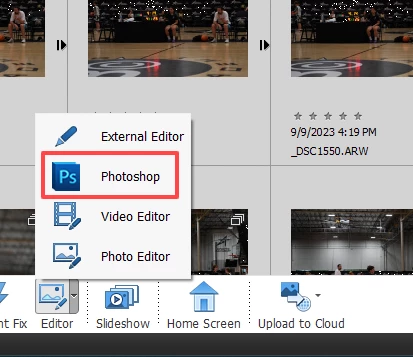
You can still use the Elements Organizer with Photoshop CC. Either use the Photoshop button from the Editor menu in the lower tool bar  or select a file and press Ctrl+H.


A copy of the file will open in Photoshop CC and will automatically be given an -edited# suffix.  When you save the file in Photoshop, the edited copy will be automatically saved in a version set or stack in the Organizer. This is true even for raw files which are not normally copied when edited in the ACR.

4 replies

Walter_H
Legend
September 17, 2023

Hi Bob!

You could also use Bridge. It is a free digital asset manager from Adobe. It works well with Photoshop.

https://www.adobe.com/products/bridge.html

--Walter in Davie, FL
Greg_S.
Community Expert
Community Expert
September 15, 2023

(If you don't want to use the Organizer, you can always use Bridge to view and open your files in Photoshop, but then you lose all the advantages of the Organizer database and must rely on a file browser option.)

Greg_S.
Community Expert
Greg_S.Community ExpertCorrect answer
Community Expert
September 15, 2023

You can still use the Elements Organizer with Photoshop CC. Either use the Photoshop button from the Editor menu in the lower tool bar  or select a file and press Ctrl+H.


A copy of the file will open in Photoshop CC and will automatically be given an -edited# suffix.  When you save the file in Photoshop, the edited copy will be automatically saved in a version set or stack in the Organizer. This is true even for raw files which are not normally copied when edited in the ACR.

Bob BradAuthor
Known Participant
September 15, 2023

Greg,  That is a cool tip!  I checked it out and it does work.  Since I started with Ps Elements (many versions over the years), I rely on the information, notes etc., I can put into The Organizer for each pic.  I'm glad to know, with your help, that I can continue that.  I am grateful that you took the time to respond!

jane-e
Community Expert
Community Expert
September 15, 2023

No, the organizer and editor do not exist in Photoshop. Photoshop simply sees files that are stored on hard drive(s) and the organization is through Window File Explorer (or Mac Finder).


Someone on the Elements forum may be able to assist you in getting the files out of the organizer and editor (if I am even using the proper terms). I'll move your post to that forum.


Jane


Bob BradAuthor
Known Participant
September 15, 2023

Thanks, Jane for taking the time to respond to my post.  You have certainly helped me understand better.