Participant
December 15, 2022
Answered

How to look at your pictures whitout silly effects and silly sounds?

  • December 15, 2022
  • 2 replies
  • 421 views

How to look at your pictures in full screen in PS Elements Organizer? Whitout silly effects and silly sounds?

This topic has been closed for replies.
Correct answer Walter_H

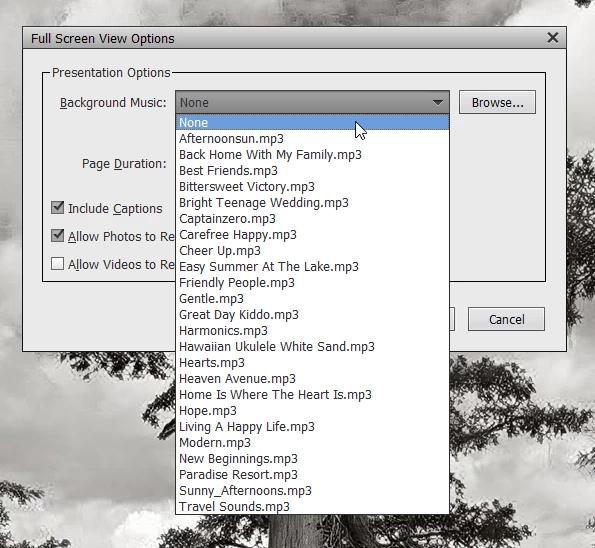
You can change the Background Music to None via the Settings menu.


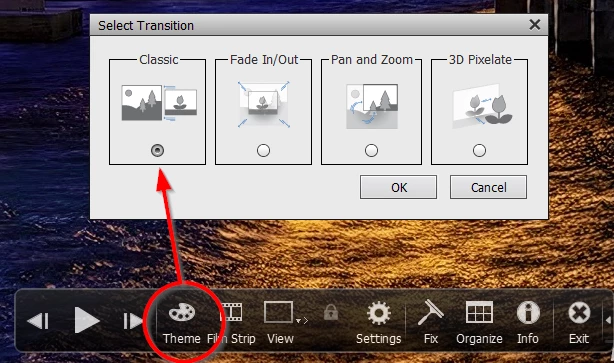
And, you can also change the Theme to Classic to avoid the "silly" transitions.

2 replies

Walter_H
Walter_HCorrect answer
Legend
December 16, 2022

You can change the Background Music to None via the Settings menu.


And, you can also change the Theme to Classic to avoid the "silly" transitions.

--Walter in Davie, FL
uffe987Author
Participant
January 12, 2023

Thank you.

MichelBParis
Legend
December 15, 2022

Just don't tick the 'play' icon for the slideshow. Navigate with the left and right triangles on each side of the Play triangle, or better, use your left or right arrow on your keyboard.

uffe987Author
Participant
January 12, 2023

Thank you, I have upgraded from ver 12 to 23 and see not so many advantages for my simple use of it.