Participating Frequently
October 4, 2022
Answered

How to make 2 two selections on the same image

  • October 4, 2022
  • 1 reply
  • 213 views

I am using Elements 2019 and the Lasso tool.  I have an image that has two different sections that I want to select and remove.  I can select one section with no problem.  When I hold the shift key down and select the second area, the marching ants appear but disappear when I release the shift key.  How do I select both areas?

Thanks,

Mike

This topic has been closed for replies.
Correct answer Greg_S.

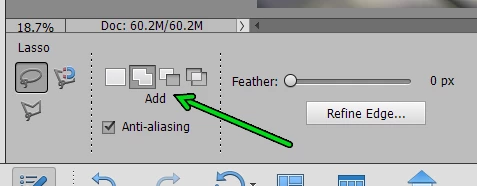
You have to be patient when using the Shift key with the Lasso tool.  But to make it easier, simply press the Add button in the tool options panel.

1 reply

Greg_S.
Community Expert
Greg_S.Community ExpertCorrect answer
Community Expert
October 4, 2022

You have to be patient when using the Shift key with the Lasso tool.  But to make it easier, simply press the Add button in the tool options panel.

Participating Frequently
October 5, 2022

Thank you Greg, I will check it out.

Participating Frequently
October 12, 2022

Problem solved.  Thank you.