
Participant
July 14, 2018
Answered

How to move the tools menu to the side?

  • July 14, 2018
  • 1 reply
  • 462 views

Hi, I'm using Photoshop Elements, and every time I try to use a tool, a menu pops up on the bottom of my screen. My screen is wide and short, so this is very disruptive. How can I make the popup either show up on the right (or just not pop up)? Thanks so much!
This topic has been closed for replies.
Correct answer Jeff Arola

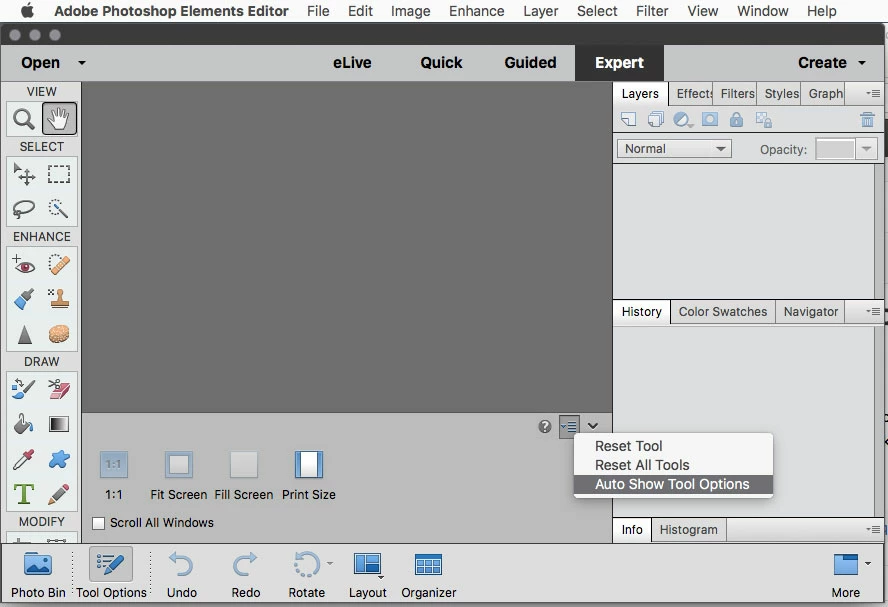
You can't move the Tool Options from the bottom, but you can keep it from opening every time you select a tool by unchecking Auto Show Tool Options.

1 reply

Jeff Arola
Community Expert
Jeff ArolaCommunity ExpertCorrect answer
Community Expert
July 14, 2018

You can't move the Tool Options from the bottom, but you can keep it from opening every time you select a tool by unchecking Auto Show Tool Options.

Participant
July 14, 2018

Thank you so much!!!