
Participant
June 4, 2020
Answered

How to put a selection from one photo into another in PSE 2020

  • June 4, 2020
  • 2 replies
  • 1182 views

Hi, I'm new to this community and for years only used an ancient PSE 4 and then a free, unsupported CS 2 because I didn't do that much editing and they served my purpose, but I recently bought PSE 2020 (for both photos and videos) and I'm having a bit of a struggle due to how very different they are to what I've been accustomed to, which is understandable I suppose. 


When putting a selection into another photo I used to simply open both photo's, make the selection in one of them and drag and drop it into the other one with the move tool. It was so easy, but now when I open the second image, the first one disappears and I can't seem toget both pictures up or go backwards.


I'd really appreciate it if someone could describe the easiest way to perform this task on PSE 2020? And are there even various ways to do it? Thank you in advance. 
 

This topic has been closed for replies.
Correct answer Greg_S.

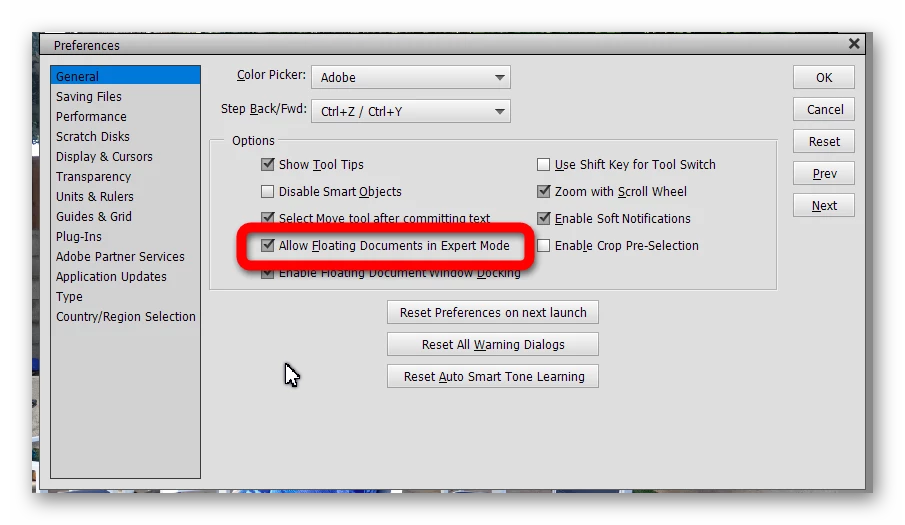
To use the method that you know, you need to enable the Allow Floating Documents in Expert Mode box in Edit>Preferences>General (Ctrl+K).


Alternatively, you can copy your selection in one image, using the Edit menu (or Ctrl+C), and then paste it into the other image (Ctrl+V).

2 replies

99jon
Legend
June 4, 2020

You can use Edit/Copy or perhaps use the menu

File >> Place

That automatically creates a new layer.


Or making a selection and pressing ctrl+j (cmd_ j) will place the selection on a new layer.

Greg_S.
Community Expert
Greg_S.Community ExpertCorrect answer
Community Expert
June 4, 2020

To use the method that you know, you need to enable the Allow Floating Documents in Expert Mode box in Edit>Preferences>General (Ctrl+K).


Alternatively, you can copy your selection in one image, using the Edit menu (or Ctrl+C), and then paste it into the other image (Ctrl+V).

Participant
June 4, 2020

Thank you Greg, that prompt response was better than I could have hoped for because I didn't think for one minute I had the option of carrying on doing it the way I always have, which is preferrable for me, although I noted also the other way you espoused as well so I now have 2 options. Anyway, thanks again ;o)