
DSAbrams
Participant
December 12, 2016
Answered

How to ReRegister Photoshop Elements 6 after reinstalling Windows

  • December 12, 2016
  • 2 replies
  • 699 views

After over 20 minutes on Chat, the technician can't answer this question:

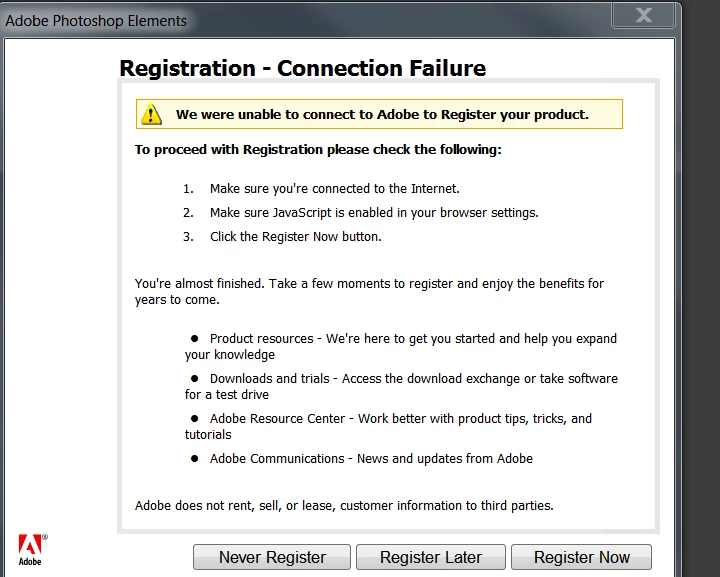
How do I reregister Adobe Photoshop Elements 6 after reinstalling Windows 7.  I get the following screen.  But:  Java is enabled on Firefox and the computer is connected to the internet.

Any help is appreciated.

Thanks
Thank you for your patience.

While you wait, you can try our community forums, where experts are available 24 hours a day, 7 days a week to answer your questions. 

You can also chat with Adobe experts live on Twitch. See our schedule for Ask the Experts LIVE, and get "How To" video live streams, ask questions, and learn new skills!

All our representatives are currently busy assisting other customers. Your wait time is approximately '2' minutes. Thank you for your patience.

All our representatives are currently busy assisting other customers. Your wait time is approximately '0' minutes. Thank you for your patience.

You are now chatting with Niangmangi.
Please don’t close the chat window or browser tab since it will end our chat session.

9:33:33 AM

Niangmangi:


Hello! Welcome to Adobe Customer Service.

9:33:37 AM

Niangmangi:


Hi There.

9:33:58 AM

you:


Hey Niangmangi.

9:34:33 AM

Niangmangi:


May I know your first name?

9:34:42 AM

you:


David

9:35:47 AM

you:


When I try to reregister I get an error message: We were unable to connect to Adobe to Register your product. Internet is connected. Java script is enabled. using firefox.

9:36:17 AM

Niangmangi:


Thank you, David.

9:36:45 AM

Niangmangi:


I understand that you are unable to re-gister  Photoshop elements 6.

9:36:45 AM

Niangmangi:


May I please have your email address registered with Adobe?

9:37:24 AM

you:


9:38:09 AM

Niangmangi:


Thank you for the email addresses.

9:38:23 AM

Niangmangi:


May I have the serial number of the product?

9:39:30 AM

you:


1057-1085-1156-1155-8480-7058

9:40:19 AM

Niangmangi:


Thank you for the serial number.

9:41:49 AM

Niangmangi:


I checked and see that the serial number is already registered in a different email address.

9:42:11 AM

Niangmangi:


May I please know all your possible email addresses?

9:42:25 AM

you:


you have all three of them there.

9:44:17 AM

you:


9:45:09 AM

Niangmangi:


Thank you for the information.

9:47:05 AM

Niangmangi:


I have rechecked and see that you have registered the serial number under dsabrams@ars-environmental.com.

9:47:48 AM

you:


how do I reregister with the newly reinstalled software?

9:48:04 AM

you:


How do I change the registration to another email address?

9:48:47 AM

Niangmangi:


Would you mind waiting for 2 - 3 minutes while I research on this issue?

9:51:28 AM

Niangmangi:


Thank you for your patience.

9:56:04 AM

Niangmangi:


David, since the serial number is already registered in the account , we do not have the options to re-gister the serial number again.

9:56:24 AM

Niangmangi:


I am sorry. The support for Photoshop elements 6 is available only through our Adobe Forums.

9:56:24 AM

Niangmangi:


Please sign in to our Adobe Forums and post the issue. Our Product Experts will reply with the resolution.

9:56:38 AM

Niangmangi:


9:56:46 AM

you:


What happens when the software shuts down because the registration switch hasn't been turned on?

9:56:50 AM

Niangmangi:


Below is the link to Adobe Forums.

    This topic has been closed for replies.
    Correct answer MichelBParis

    dsabrams wrote:

    After over 20 minutes on Chat, the technician can't answer this question:

    How do I reregister Adobe Photoshop Elements 6 after reinstalling Windows 7. I get the following screen. But: Java is enabled on Firefox and the computer is connected to the internet.

    Any help is appreciated.

    Elements is now a very old version and is not supported by Adobe. I am quite sure that nearly all Adobe staff members on the help desk have never used (or ever heard of it...)

    The good news is that you can install it like me even on a Windows 10 OS. You have installed in Windows 7, that's good.

    You need to have the original CD (or a copy of its contents) and the serial number.

    You can't register it, there is no longer a server for that...

    Simply ignore by clicking the button 'Never Register'.

    Don't worry, if you have to reinstall it, you'll only need your CD and your key.

    2 replies

    DSAbrams
    DSAbramsAuthor
    Participant
    December 12, 2016

    thanks Michael.

    MichelBParis
    MichelBParisCorrect answer
    Legend
    December 12, 2016

    dsabrams wrote:

    After over 20 minutes on Chat, the technician can't answer this question:

    How do I reregister Adobe Photoshop Elements 6 after reinstalling Windows 7. I get the following screen. But: Java is enabled on Firefox and the computer is connected to the internet.

    Any help is appreciated.

    Elements is now a very old version and is not supported by Adobe. I am quite sure that nearly all Adobe staff members on the help desk have never used (or ever heard of it...)

    The good news is that you can install it like me even on a Windows 10 OS. You have installed in Windows 7, that's good.

    You need to have the original CD (or a copy of its contents) and the serial number.

    You can't register it, there is no longer a server for that...

    Simply ignore by clicking the button 'Never Register'.

    Don't worry, if you have to reinstall it, you'll only need your CD and your key.