
Known Participant
May 27, 2024
Answered

How to set default to RGB in Photoshop Elements 2024 Education Version (Windows 11)

  • May 27, 2024
  • 2 replies
  • 637 views

Hi, I opened a PDF file today and I wanted to highlight something in yellow.

I clicked on the foreground color square at the bottom left of the screen, then selected yellow in the Color Picker.  I clicked on OK.

The foreground color square did not change to yellow.  It remained what I would call a light blue-green.

I have used my Photoshop Elements 2024 several times since I bought it.  I don't recall this ever happening before.

I learned online that I could click on Images > Mode , and then change the setting to RGB.

But when I close the program and open it again, the mode changes back to Grayscale.

I want the mode to be RGB every time I open the program.

Why did this happen?

How do I change the default setting to RGB?  That should be easy, right?

I have wasted quite a bit of time on this so far.


Thanks in advance,

Steve
 

This topic has been closed for replies.
Correct answer Jeff Arola

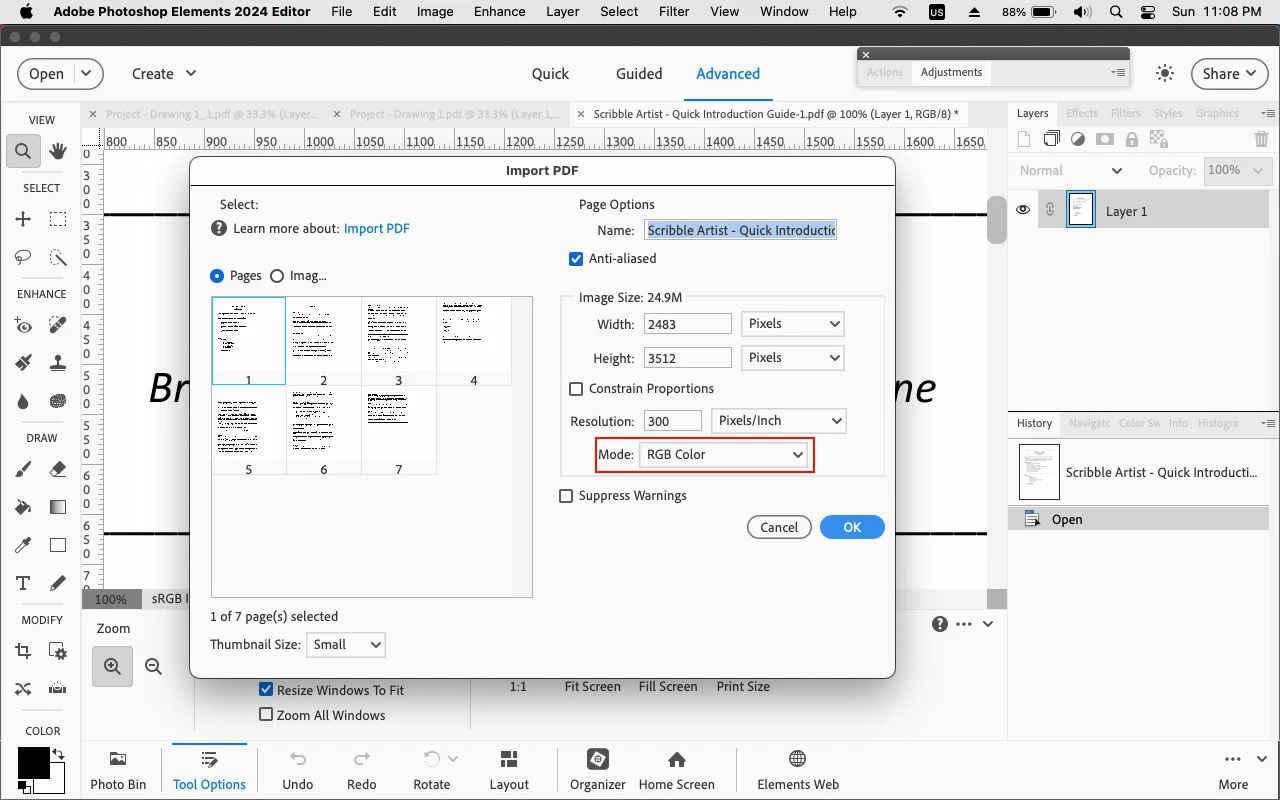
In the Import PDF dialog change the Mode to RGB Color.

That should stay until you change it.


2 replies

Jeff Arola
Community Expert
Community Expert
May 27, 2024

Did you already save that pdf from photoshop elements before?


If so, it was saved in Grayscale, so that's why it would open as Grayscale.

Jeff Arola
Community Expert
Jeff ArolaCommunity ExpertCorrect answer
Community Expert
May 27, 2024

In the Import PDF dialog change the Mode to RGB Color.

That should stay until you change it.


smaricicAuthor
Known Participant
May 27, 2024

Hi, Jeff,

     Thank you for your quick replies.

     Yes, your answer about changing the mode to RGB Color in Import PDF worked beautifully.

     I had tried to change the Import PDF settings by clicking on File > Import, but the only choice I saw there was WIA, not PDF. 

     I didn't even notice the choice you pointed out (after I clicked on Open With... PSE).  I just double-clicked on the page I wanted to open without looking around first.


 Thanks for your help,

  Steve