Known Participant
November 23, 2025
Answered

How to turn off automatic hyphenation in PSE2026

  • November 23, 2025
  • 2 replies
  • 382 views

I like that PSE now has spell check, but apparenly it has also implemented automatic hyphenation for text boxes.  Does anyone know how to turn this off without manually adding returns in my text?  I hate hyphenations.  Everything I google tells me how to do it in full Photoshop (and Elements doesn't have the screens referenced in the instructions). 

If it can't be turned off, then please add that capability in an update.

Correct answer Jeff Arola


Did you open a document that already had the Type layer hyphenated?


I was able to replicate the issue of Hyphenation by opening a document with Paragraph text created with Photoshop that had Hyphenation enabled.


After that, creating Paragraph text in Photoshop Elements 2026 even on a new document, Hyphenation was enabled.


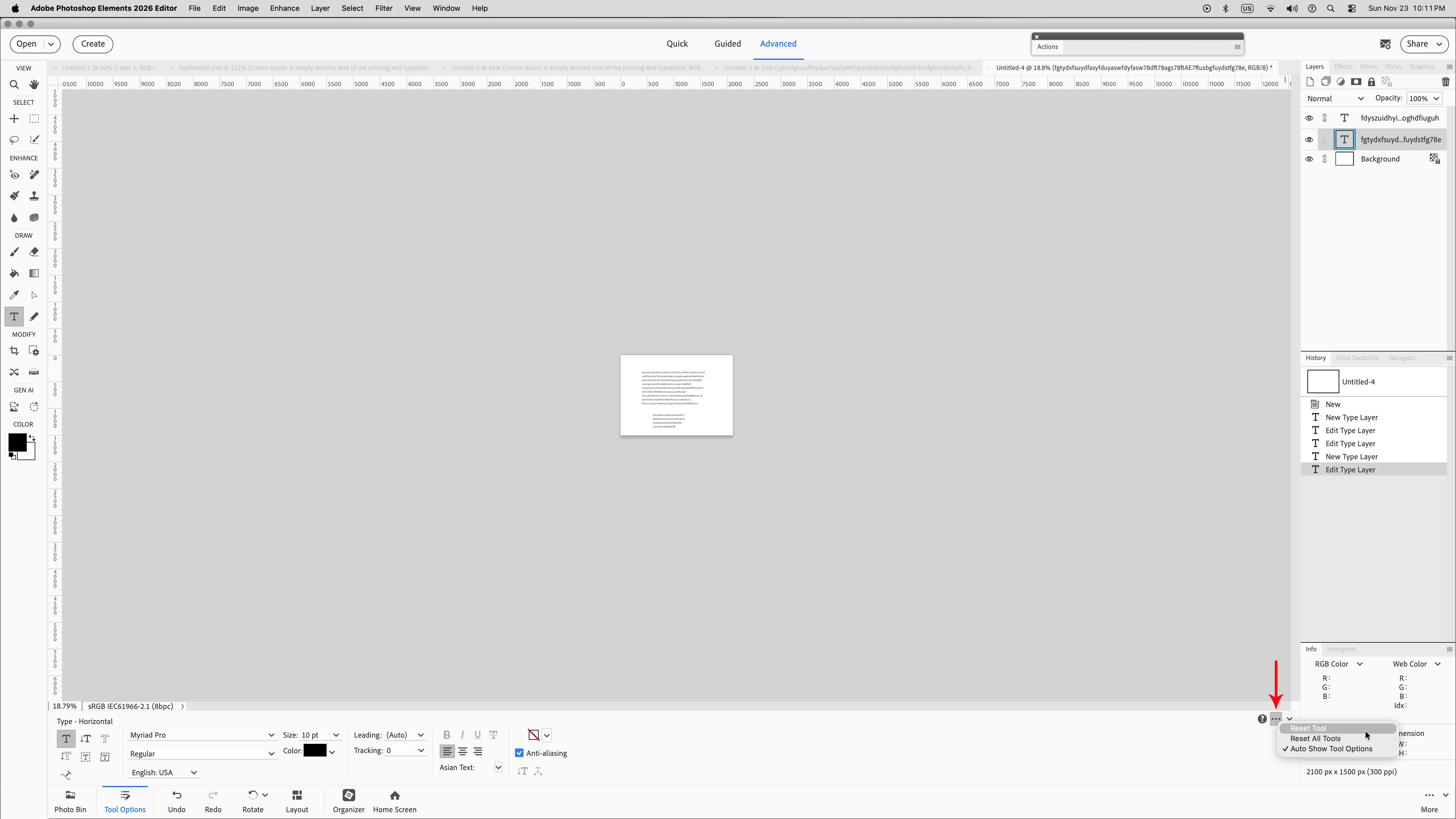
I believe i turned it off by resetting the Horizontal Type Tool by creating a new document, then clicking on the three little

dots and clicking Reset Tool.


After that try a new document and some Paragraph text.


2 replies

Jeff Arola
Community Expert
Jeff ArolaCommunity ExpertCorrect answer
Community Expert
November 24, 2025


Did you open a document that already had the Type layer hyphenated?


I was able to replicate the issue of Hyphenation by opening a document with Paragraph text created with Photoshop that had Hyphenation enabled.


After that, creating Paragraph text in Photoshop Elements 2026 even on a new document, Hyphenation was enabled.


I believe i turned it off by resetting the Horizontal Type Tool by creating a new document, then clicking on the three little

dots and clicking Reset Tool.


After that try a new document and some Paragraph text.


Known Participant
November 24, 2025

I created a new document, activated the text tool, created a new text box, typed some text, then copied and pasted it a bunch of time and the hyphenation was automatically included. I will try resetting the type tool tomorrow. I am not near my laptop at the moment. I was using a document created in full PS before I started having the issue, so it is suppose it is possible that the feature became attached to my tool properties. But I have since closed and restarted PSE26 and that alone did not fix the issue. But I'll try resetting the tool tomorrow and let you know.....

Glenn 8675309
Legend
November 24, 2025

I've just spent 30 minutes trying to get any hyphenation, and I couldn't.  Do you have version 26.1 or version 26.0 installed?

I tried all possible keyboard shortcuts and I simply could not get any hypenation. 
I tried 3 different versions of PSE and could not get any hyphenation.

Known Participant
November 24, 2025

I'm using PSE 26.1.  I don't think you will get hyphenation with placeholder text bc those word probably aren't your PCs dictionary so PSE doesn't know where to place the hyphenation.  Older versions do not have hyphenation.  I ended up opening my file in PSE25 and doing the text there when I finished everything else.  Attached is a screenshot where you can see the hyphenation on 2 of the lines.