
How to use masks to specify just one area of my photo to apply the Enhance->unsharp mask tool.
Good Morning all,
Not even sure what i'm asking is possible. The reason i'm trying to use a mask is because i had been trying to sharpen my image using 'refine edge'->Adjust edge, and , (after increasing the smooth and contrast) i still can't see a difference in the edge when i compare the old and changed pic.
So, i started watching some self help videos and they suggest using the 'unsharp mask' tool/option? (not sure which it is, tool or option?) to sharpen my image. I tried, but it applies its effect to every object on the canvas.
I just want to sharpen my friend Davis's arms (too blurry). I thought a mask would be a good idea so i selected one of his arms and then clicked 'add a mask; located right next to 'create new fill or adjustment layer' but know i don't have the option to use the unsharp mask (its grayed out)
I've included a pic of what project looks like.
Thank you so much for any direction you might be able to provide.
Brian 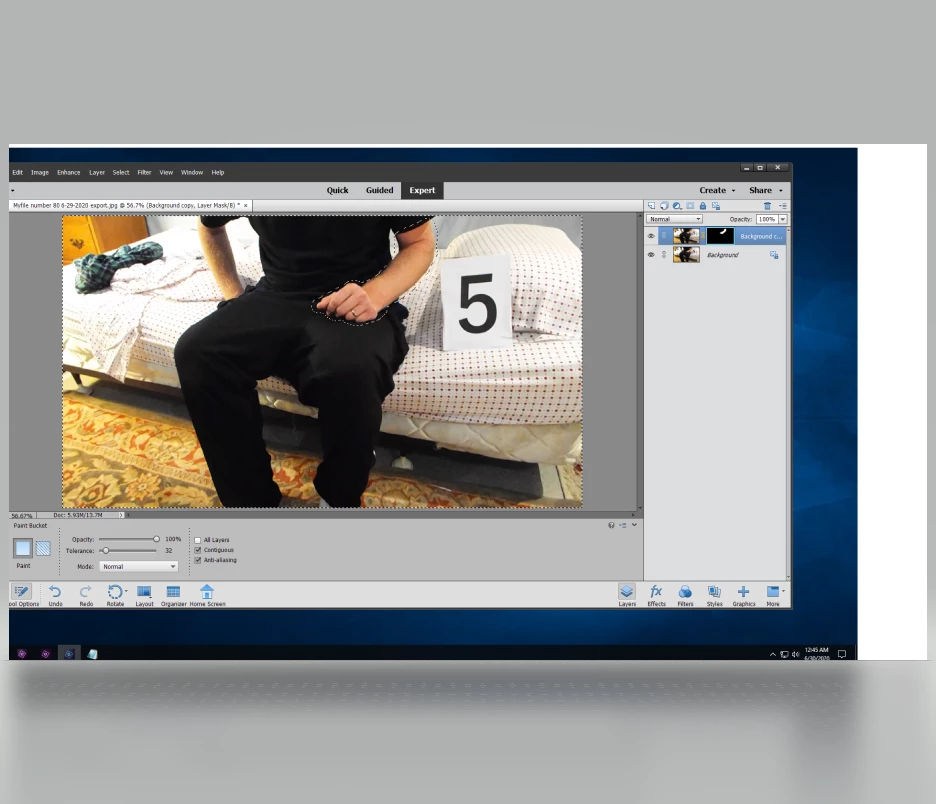
 AdChoices