Participating Frequently
March 22, 2020
Question

I can't open PS Element15

  • March 22, 2020
  • 2 replies
  • 349 views

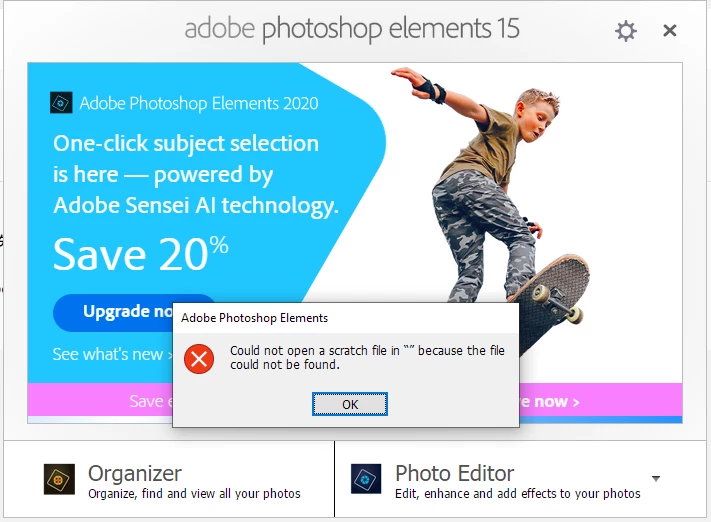
This started recently but when I try to open my PS Element15, there is an error message and I can't open it.


What is the problem? I don't think I deleted any files of PS Elements15.

Thanks.
This topic has been closed for replies.

2 replies

Greg_S.
Community Expert
Community Expert
March 22, 2020

Which Elements program are you trying to open?  Or is this happening on the Welcome screen?  If it is happening on either the Organizer or Editor, try deleting the preferences file.  Immediately after launching the program, press Alt+Shift+Ctrl. A message should pop up asking if you want to delete the Settings file. Answer OK. 

rinettaAuthor
Participating Frequently
April 11, 2020

Hi, Im sorry the reply was in the spam folder.
I was trying to open Photoshop Element 15.

It had been working without problem but I don't use it very often, the last time I used must have been in Dec or Jan.

When I click the PSE icon and then click photo editor, it gives me that error message.

When I click the Organizer, it opens but closes immediately even when I press Alt+Shift+Ctrl. A message doesn't pop up.

Nancy OShea
Community Expert
Community Expert
March 22, 2020

Moved from Photoshop CC to PS Elements forum.

  • Which operating system do you have?
  • Do your data files reside on your primary hard drive the same as PS Elements?


Nancy O'Shea— Product User & Community Expert
rinettaAuthor
Participating Frequently
April 11, 2020

Hi, Im sorry the reply was in the spam folder. 

I have Windows 10 Home.


Yes they are on the same hard drive.


It had been working without problem so I have no idea what happened.


rinettaAuthor
Participating Frequently
April 11, 2020

Hello again, I just restarted the PC and it opened! Sorry for the bother!
