


Participant
December 24, 2019
Answered

I cannot find any photos in Elements Organizer

  • December 24, 2019
  • 2 replies
  • 438 views

When I look for photos in Elements Organizer, I find videos under all media. I try to download pictures and it says they are already there.


[Moving from generic Start/Help forum to the specific Program forum... Mod]
[To find a forum for your program please start at https://community.adobe.com/]

This topic has been closed for replies.
Correct answer Greg_S.

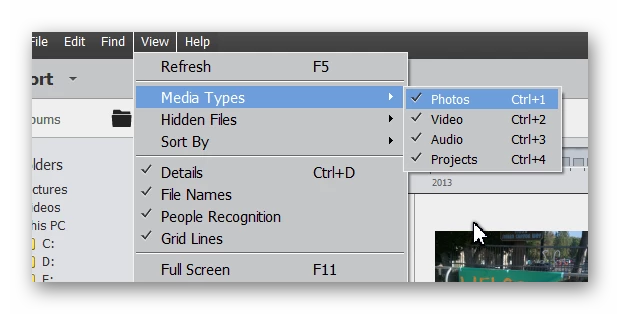
It sounds like you have inadvertantly pressed Ctrl+1.  This removes all photos from the grid.  Try pressing it again and your photos should appear.  Or, you can go to the View>Media Types menu and make sure that Photos is checked.


2 replies

Greg_S.
Community Expert
Community Expert
July 28, 2021

@DonnaJG, since you say you have a different problem, please start a new discussion describing in detail what your problem is.   With the little information you have provided so far, all I can say is that your Elements 2018(?) and Elements 2021 catalogs are different and will not be synchronized, except at the time of initial conversion.

Greg_S.
Community Expert
Greg_S.Community ExpertCorrect answer
Community Expert
December 24, 2019

It sounds like you have inadvertantly pressed Ctrl+1.  This removes all photos from the grid.  Try pressing it again and your photos should appear.  Or, you can go to the View>Media Types menu and make sure that Photos is checked.


Pdaddy1Author
Participant
December 25, 2019

Thank you, that was it! I need a good course to learn this Photoshop, any suggestions?