Participating Frequently
October 30, 2022
Answered

I have Adobe Photoshop 15. The line tool still works but the arrow at the end does not.

  • October 30, 2022
  • 3 replies
  • 304 views

I have Adobe Photoshop Elements 15. Everything seems to work except the arrow at the end of a line.

Read the directions yes. Still does not work. Worked fine until recently.

This topic has been closed for replies.
Correct answer Greg_S.

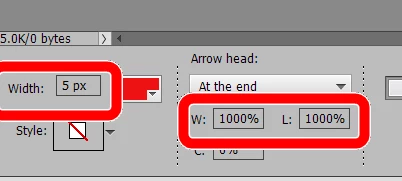
You have the line width set to only 1 pixel.  Increase the width to maybe 5 pixels.  Also, you have the arrowhead dimensions set to 10% of the line weight.  Increase that number to maybe 500 or 1000%.


3 replies

Greg_S.
Community Expert
Greg_S.Community ExpertCorrect answer
Community Expert
November 2, 2022

You have the line width set to only 1 pixel.  Increase the width to maybe 5 pixels.  Also, you have the arrowhead dimensions set to 10% of the line weight.  Increase that number to maybe 500 or 1000%.


Participating Frequently
November 2, 2022
Thanks Greg,
That worked.
I keep the line size small then the arrow size is definitely different from
the original setting(s)
I think this came out about how I need it to, again thanks!
Eric
Participating Frequently
November 2, 2022

I tried as you asked Greg. Still did not fix the issue..

Greg_S.
Community Expert
Community Expert
October 30, 2022

Try resetting the preferences file. Go to Edit>Preferences>General tab and click the Reset Preferences on next launch button.

Participating Frequently
November 2, 2022
Sorry Greg,
I tried as you asked, did not help. This is what I see from the last
adobe upgrade to version 64