

bernie_w
Participant
March 27, 2026
Answered

I want to enlarge the fonts in photoshop Elements 18. The only options at Edit>Preferences>Display were "automatic, !00%, and 200%." Automatic and !00% were the same. 200% made the program inoperable. I needed a slider to adjust UI to my old eyes

  • March 27, 2026
  • 2 replies
  • 28 views

The instruction I found were good, but the options I was directed to were not flexible enough. Thank you for any more help you might provide.
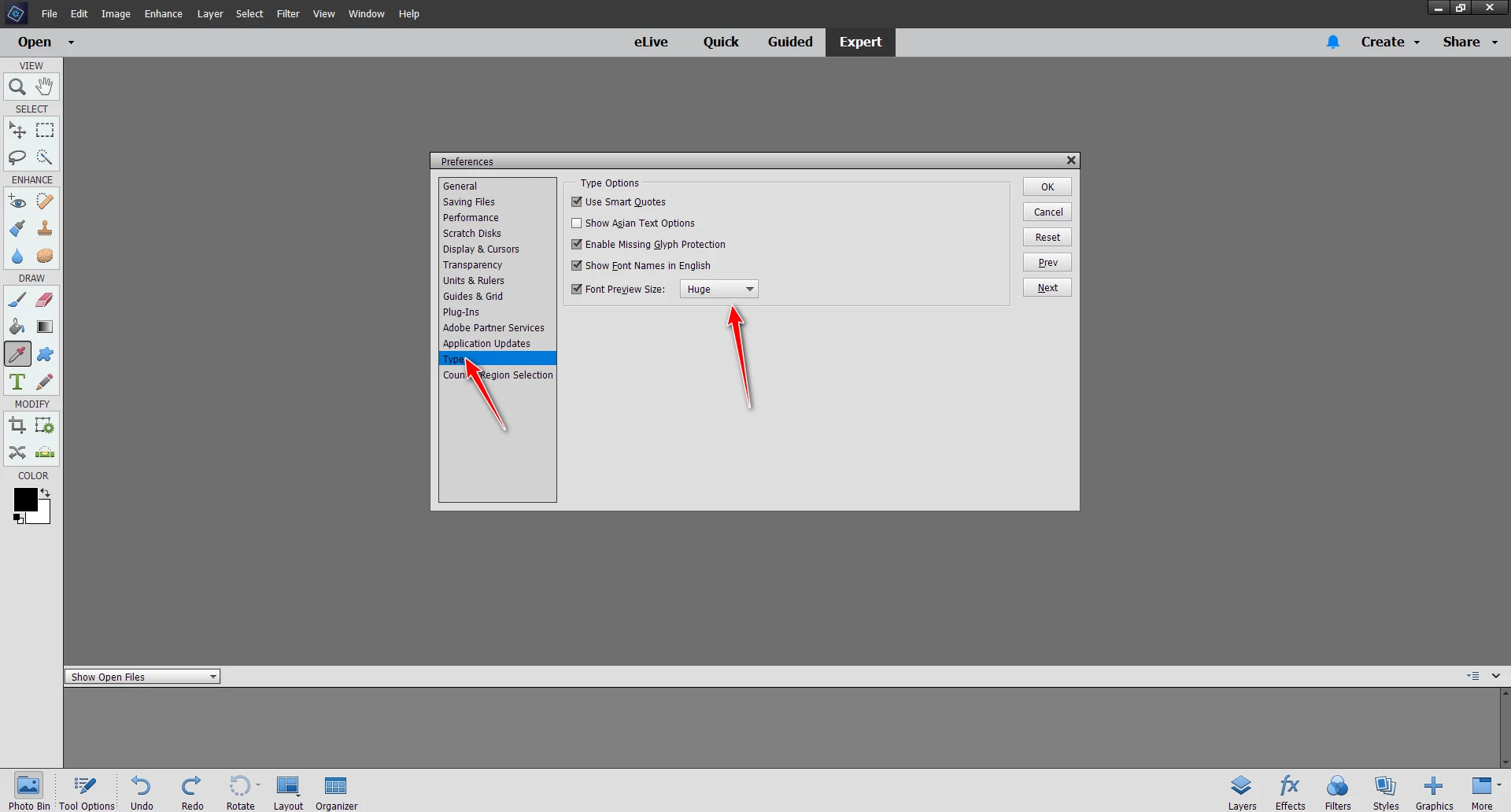
    Correct answer Glenn 8675309

    It’s in the editor preference  file.

    Just do what the red arrows are pointing to. 


    2 replies

    Phinny
    Legend
    March 27, 2026

    You might also try:

    Settings> System> Display> Custom Scaling

    and/or

    Settings> Accessibility> Text Size


    Glenn 8675309
    Glenn 8675309Correct answer
    Legend
    March 27, 2026

    It’s in the editor preference  file.

    Just do what the red arrows are pointing to. 


    Glenn 8675309
    Legend
    March 27, 2026

    My wife got me a 32” monitor for christmas two years ago as well- prenominal difference.