
Participant
December 26, 2021
Question

Icon/photo don't show in PSE in layers
  • December 26, 2021
  • 1 reply
  • 763 views

Hello,

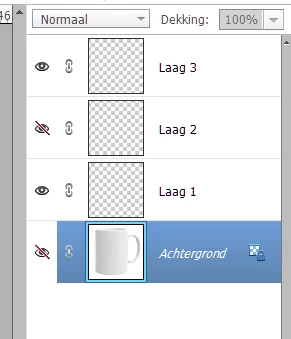
I don't see the icon at the layer when I change preference. 
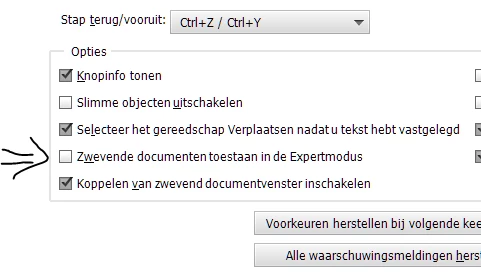
When I select the option (near the arrow) the icons at the layers disappear. It doesn't matter or its a small or big icon. When I deselect, I can see them. Is this a bug? I've heard that more people have the same problem.
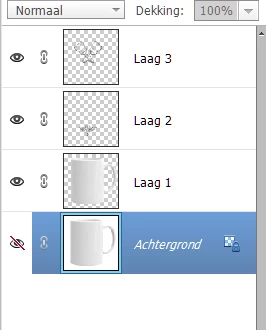
Without the selection I see the icons.
 I have PSE 2022, windows 10, 64mb, 18gb.
thx
Corry

This topic has been closed for replies.

1 reply

Glenn 8675309
Legend
December 26, 2021

If I understand you correctly:   You have the arrouw pointing to "allow floating documents in expert mode" .

In the image you attached in your original post you have that layer visibility turned off.   Those images i nthe layers panel on the right?  I think most poeple call them thumbnails, not icons. 


Participant
January 1, 2022
Hello, I think you don't understand my question 🙂

If I turne on V "allow floating documents in expert mode" then I don't see the thumbnails.
When I turne off "allow floating documents in expert mode" then I see the thumbnails.
That what you show in your answer I know but it is not what I mean.
If you look at my pictures you don't see any thumnail in the gray area of the layer. I don't have turned the visibility off on every layer, and then you still have to see what is in that layer.

So my question is, is it a bug in pse that the layers don't show a thumbnail in floating documents?
 
I have heard other people complaining on the same problem.
This are the layers on the right site in floating documents.


This are the layers when I turned off the floating documents, here you can see what is in the layer. 
And it doesn't matter if the eye is on or off.

I hope you understand my question now.
thx Corry


Always learning, never too old :)
Glenn 8675309
Legend
January 1, 2022

That's really interesting- I've never seen it before, I will try to duplicate i, and get back to you. 

Dat is echt interessant - ik heb het nog nooit eerder gezien, ik zal proberen i te dupliceren en contact met je op te nemen.