
Image conversion problem with grayscale 8-bit tif
Hello,
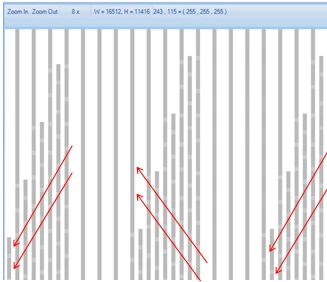
I am using an 8-bit tif test image to test image quality in qualifying commercial printheads. Its a stochastic image with 20-40% DC made up of straight lines that are compounded to increase the DC. When I open this in Adobe the image looks fine but when printed the image comes out with certain areas broken in 7-8 pixel segments (think dotted line). When I convert this to a bmp it prints correctly (which makes sense since its a 1bit image now). But why does the image appear broken when in grayscale? I opened this same file with Photo Pro and the image opens with the 7-8 pixel segments which seems to be how the file was either created or became corrupted that way.
So my question: Why does Photoshop falsely represent the image. Originally I suspected a data load problem since I was not able to find the issue when initially viewing the image with Photoshop.
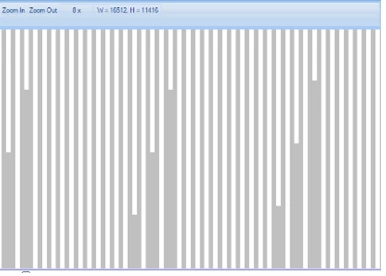
tif as it appears in Photoshop and bmp conversion.
same tif opened in Photo Pro (creates this chevron image defect).
 AdChoices