Participating Frequently
February 21, 2017
Answered

Import - Folders Missing

  • February 21, 2017
  • 2 replies
  • 552 views

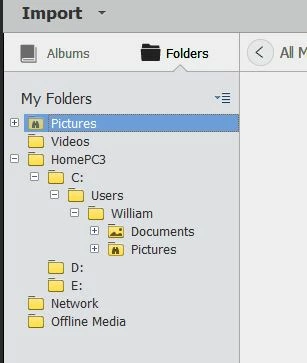
I navigate down the folder tree to Users/***.   There are a number of folders under "Users/William" that contain photos that are not shown.  Am using PSE 15.  Why?
This topic has been closed for replies.
Correct answer arshla jindal

Hi,

By default, Folders' tree view shows only the relevant folders (root folders and the folders from which media is already present in Organizer).

If you still wish to see all the subfolders under a folder, then right click on that subfolder and select "Show All SubFolders"

This would enlist down that folder's complete hierarchy as on hard disk. Further, to import media from any of these subfolders, right click on it and select "Import Media".

I hope this would answer your query. Please get back to me in case of any further doubts.

Thanks,

Arshla

2 replies

WWolfe01Author
Participating Frequently
February 22, 2017

Thank you - This addressed this problem.  I am still curious why I cannot add a new folder under 'My Folders'.  I am also curious about the following.  When I start the Organizer I see all the photos in all the subfolders.   If I click on one subfolder I see only those pictures.  I don't seem to be able to get back to seeing all the photos in all the subfolders without restarting the Organizer.

Adobe Employee
February 24, 2017

Hello,

Glad that your query has been answered to.

I am still curious why I cannot add a new folder under 'My Folders'

"My Folders" is not itself a folder but a header for the folders panel. So adding a folder to it doesn't make sense as it doesn't exist on your hard disk.

You can't create a root folder (like Pictures, Computer, etc.) but you can create folders and subfolders under these root folders.

For this, be in the tree view (View as Tree) of folders, right click the folder and select New Folder.

When I start the Organizer I see all the photos in all the subfolders.   If I click on one subfolder I see only those pictures.  I don't seem to be able to get back to seeing all the photos in all the subfolders without restarting the Organizer.

When you click on a folder, this filters out the media of only that folder which have been imported in Organizer. To clear this filter, you need not restart the application. On top of the grid, you will see a button " < All Media" to go back to unfiltered view. Click this and here you are with all folders media.

Thanks,

Arshla

WWolfe01Author
Participating Frequently
February 24, 2017

Thank you very much for your support.

arshla jindalCorrect answer
Adobe Employee
February 22, 2017

Hi,

By default, Folders' tree view shows only the relevant folders (root folders and the folders from which media is already present in Organizer).

If you still wish to see all the subfolders under a folder, then right click on that subfolder and select "Show All SubFolders"

This would enlist down that folder's complete hierarchy as on hard disk. Further, to import media from any of these subfolders, right click on it and select "Import Media".

I hope this would answer your query. Please get back to me in case of any further doubts.

Thanks,

Arshla
