Participant
January 20, 2018
Answered

Import photos from Lightroom 6 into Elements 2018

  • January 20, 2018
  • 3 replies
  • 544 views

Hi,

I am using both Lightroom 6 and Photoshop 2018 on a WIN 10 Desktop. Primarily I Import and process photos in LR and want to use the Elements Editor for creative projects (layers etc.).  When trying to continue processing a photo from LR in PSE, a dialgo box opens with three Options: a) continue with copy including LR changes, b) use copy of original photo however without LR modifications, b) use original photo. Of Course it is option a) I want to use.

My Problem: while options b) and c) work fine, in option a) the PSE Editor opens without photo

Any suggestion how to solve this problem is very much appreciated!

Greg

This topic has been closed for replies.
Correct answer 99jon

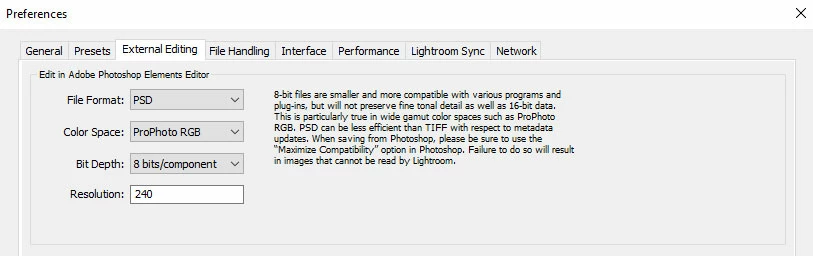
What are the pref settings for rendering in PSE. I have mine set to 8bit PSD (see image below) as there are limited options in Elements for 16 bit editing and a jpeg can easily be exported from a layered PSD file. Do you see any error message if you wait? I’ve sometimes seen this up to a minute or so later and after dismissing it the image appears in PSE.

3 replies

Participant
May 17, 2021

Hi Gregor

I have the same problem and it takes about 2 minutes for the picture to appear after I click on the error message in Lightroom.

Did you get a suitable solution as its driving me mad as it takes so long to copy a pic

Gerry

Participant
January 21, 2018

The pref setting was 8bit TIFF, changed that to 8bit PSD. I still get after 2-3 minutes an error message, however the Image shows up in PSE! Strange...

Thanks for the advice!

99jon
99jonCorrect answer
Legend
January 20, 2018

What are the pref settings for rendering in PSE. I have mine set to 8bit PSD (see image below) as there are limited options in Elements for 16 bit editing and a jpeg can easily be exported from a layered PSD file. Do you see any error message if you wait? I’ve sometimes seen this up to a minute or so later and after dismissing it the image appears in PSE.