
Toorbul
Participant
March 19, 2025
Answered

In Elements Organizer, do Catalogues have to be in same drive as software

  • March 19, 2025
  • 1 reply
  • 303 views

in my PC setup i have all sofware & system files in C: and i have all my photos in E:

I'm about to set up Elements Organiser Catalogues and asking which drive should they be set up in

I'm thinking E: but does Elements decide anyway

Cheers

Ken M
    Correct answer Greg_S.

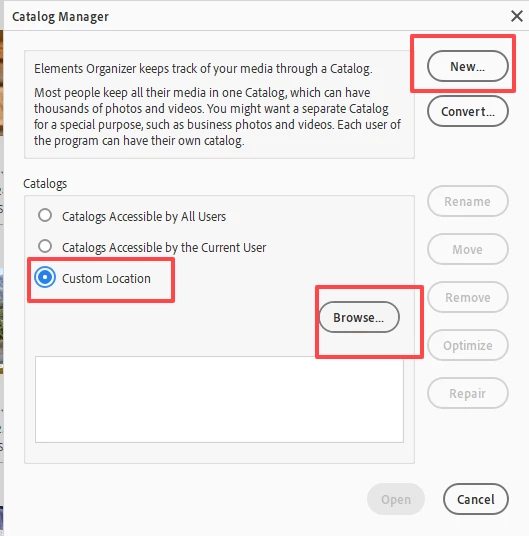
    When you create a new catalogue in Elements it will default to your system drive.  However, you can save the catalogue folder anywhere.  Under File>Manage Catalogs, you should click on the Custom radio button and set the E drive or a new folder on that drive as the location.  When you click the New (catalogue) button, the catalogue will be placed there.

    If you have already created the catalogue, you can move it to your E drive using Windows File Explorer.  Once it is in the new location, double click on the catalog.pseXXdb file (where XX is the version number of your program) and the catalogue will automatically open in the Organizer.


    1 reply

    Greg_S.
    Community Expert
    Greg_S.Community ExpertCorrect answer
    Community Expert
    March 19, 2025

    When you create a new catalogue in Elements it will default to your system drive.  However, you can save the catalogue folder anywhere.  Under File>Manage Catalogs, you should click on the Custom radio button and set the E drive or a new folder on that drive as the location.  When you click the New (catalogue) button, the catalogue will be placed there.

    If you have already created the catalogue, you can move it to your E drive using Windows File Explorer.  Once it is in the new location, double click on the catalog.pseXXdb file (where XX is the version number of your program) and the catalogue will automatically open in the Organizer.


    Toorbul
    ToorbulAuthor
    Participant
    March 19, 2025

    Greg, Again thanks for quick & clear response

    Compared with Adobe AI chat you are light years ahead

    Cheers

    Ken M

    kglad
    Community Expert
    Community Expert
    March 19, 2025

    and again, in the future, to find the best place to post your message, use the list here, https://community.adobe.com/

    p.s. i don't think the adobe website, and forums in particular, are easy to navigate, so don't spend a lot of time searching that forum list. do your best and we'll move the post (like this one has already been moved) if it helps you get responses.


    <"moved from using the community">