Participant
January 14, 2011
Answered

Inability to move and resize objects

  • January 14, 2011
  • 2 replies
  • 47600 views

Hi,

I'm new to photoshop and been taking a crash course in figuring things out to design a book cover for a cookbook I am publishing.  I've got everything pretty much how I'd like it, but several times I'm unable to acess certain items on the screen.

For instance I have a 1/2 inch blue bar I've inserted that runs across the top of the cover.  Under it I inserted a 1/4 inch red bar.  I realized the red bar wasn't exactly the same length as the blue bar but for the life of me I can't figure out how to get to it to adjust it.  I clicked on the layer it's on, on the side - tried moving the layer up and down - tried making all the other layers invisable.

I'm sure it's something very simple I'm missing, but it's really bothering me.  Other than that I love the program and it's perfect for designing book covers if you don't mind the learning curve.

cookbookwriter
    This topic has been closed for replies.
    Correct answer

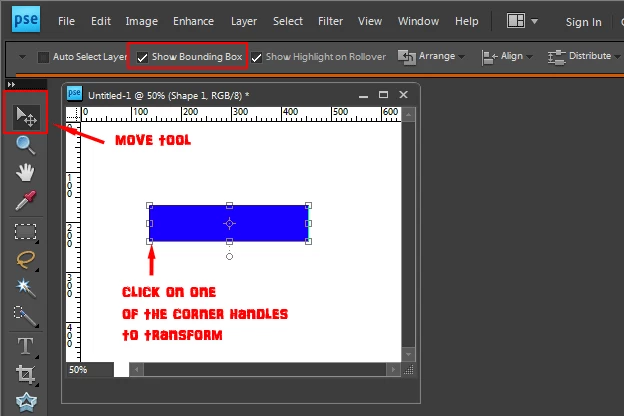
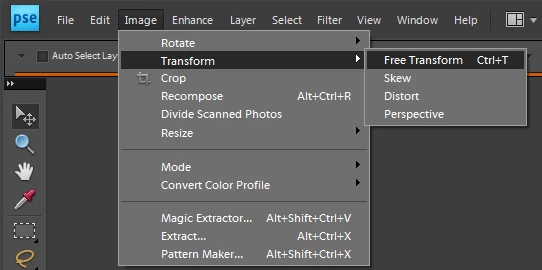
    In photoshop elements, transform is under Image>Transform.

    Also if you select the move tool and click on one of the corner handles

    that lets you transform also. (show bounding box needs to be checked in the

    tool options bar when the move is selected to see the corner handles)

    For future reference there is a photoshop elements forum:

    http://forums.adobe.com/community/photoshop_elements

    MTSTUNER

    2 replies

    Noel Carboni
    Legend
    January 14, 2011

    Edit - Transform?  There are a number of variants.

    -Noel

    acresofgreen
    Inspiring
    January 14, 2011

    Try this:  Select the layer that contains the bar you want to change in the layers panel and select Edit - Free Transform from the menu bar at the top of the screen.  You should then be able to change the size of the bar by dragging the edges or enter a value for width and height.

    Participant
    January 14, 2011

    Thanks for your help.  I knew it had to be something simple I had missed.  I am using Photoshop Elements 9 and it doesn't have Free Transform listed in the edit menu.

    Any other possibilities?

    acresofgreen
    Inspiring
    January 14, 2011

    This is the forum for Photoshop, not Photoshop Elements.  You might be lucky and someone here may have both programs, but your chances of getting help with Elements are much greater if you post your question in the Photoshop Elements forum http://forums.adobe.com/community/photoshop_elements

    Good luck!