Participant
September 24, 2024
Question

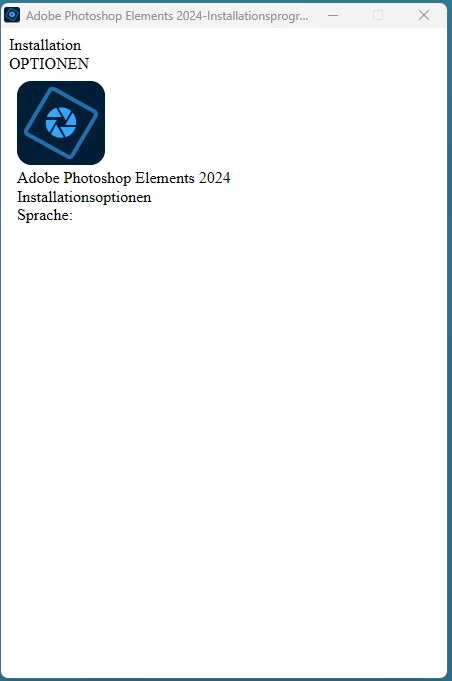
Installationsprogramm wird nicht richtig angezeigt
  • September 24, 2024
  • 2 replies
  • 193 views

Hallöchen

Das installationsprogramm wird nicht richtig angezeigt

komplett neuer pc mit window 11

hat da jemand eine idee?

Sonnige Grüsse

Jürg

This topic has been closed for replies.

2 replies

Greg_S.
Community Expert
Community Expert
September 25, 2024

This appears to be the license agreement.  Again, try to use the Tab-key to move around the document.  Perhaps use the Spacebar/Enter keys to check any required boxes.


Otherwise, you can try to resize the window.  What is the size and resolution of your monitor?  Try right-clicking on your Windows desktop and choose Display Settings.  In the Scale & layout section, make sure the monitor is set to the recommended resolution and then adjust the scale percentage.


Participant
September 26, 2024

Hi Greg

In this case i tried that in different way and several times.
But you are rigth, i shoud try your recomendation to play with the resolution of my monitor - I had this in my minde too 🙂

I let you know if it was successful or not.

kind regard

Jürg

Greg_S.
Community Expert
Community Expert
September 24, 2024

Try pressing the Tab-key to move around the installation dialog.

If that doesn't work, I suggest you contact Adobe Elements support. You can start a chat session by going to the Contact Adobe Support page  and clicking on the chat button in the lower right corner of the page. Make sure you are signed into your Adobe account and try typing Agent when the chat window opens.  That way, you should be directed to a live person rather than go through the chat robot.

Participant
September 25, 2024

Hi Greg

Thanks for your clue, i could do the first step to install elements 2024. but now the next failure...


Contact Adobe Support page would be the same to talk with a tree - no answer...