russellj45449448
Inspiring
October 17, 2018
Answered

installer window too small

  • October 17, 2018
  • 8 replies
  • 8875 views

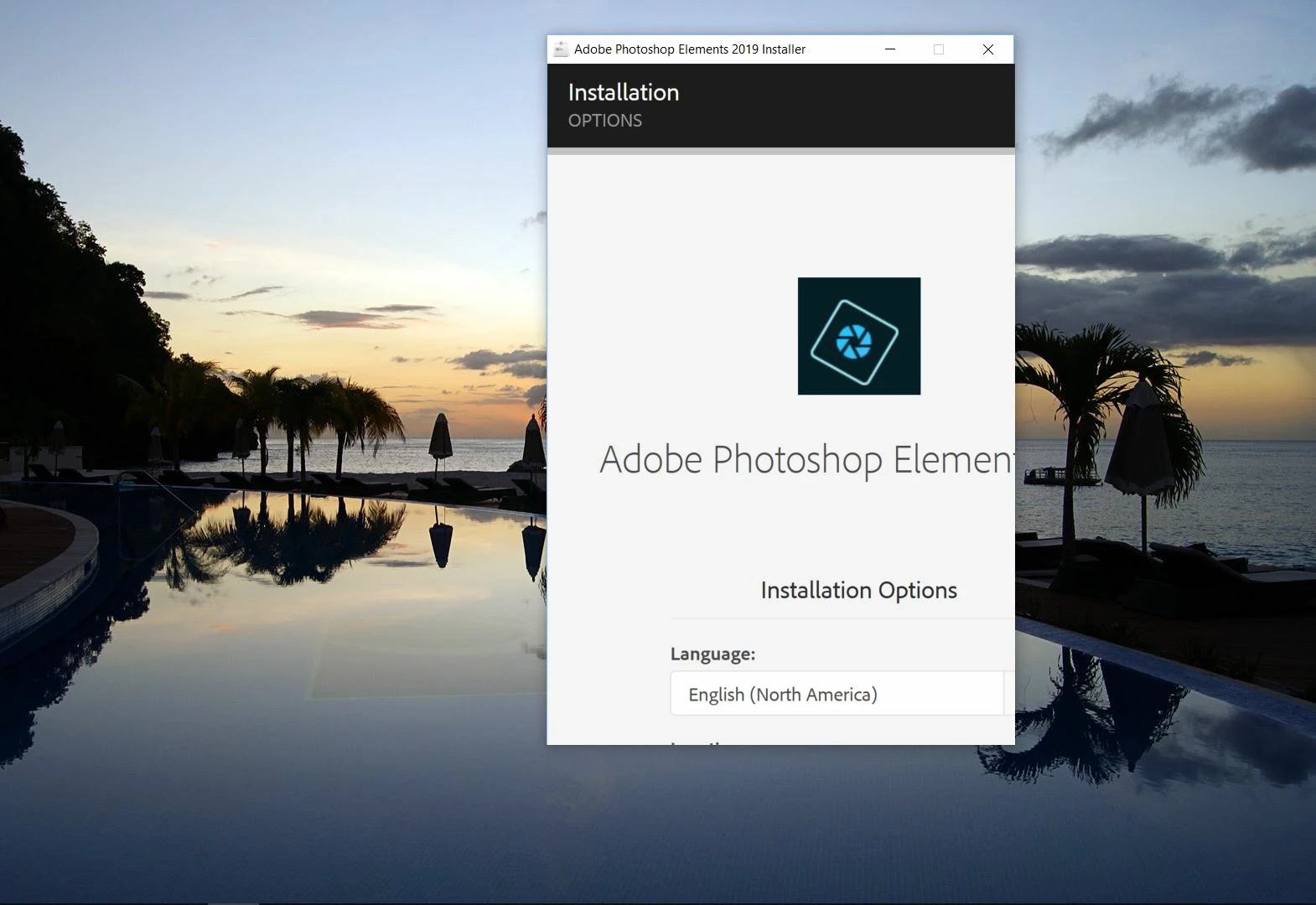
Adobe Photoshop Elements 2019 installer window too small for page size can't see buttons to install. I use Windows 10 Professional x64. Elements 2018 worked fine

Correct answer russellj45449448

Okay, the issue is solved. My third attempt through a remote session with support was successful. The last guy ended up offering my money back LOL.

All I can tell you is that because he installed it from the environment of the support window he was able to manipulate the page within the installation window to access the install button and it the installed with no trouble at all.

Thank you all

8 replies

Participant
June 16, 2025

Hold down CTRL + right mouse button + turn the wheel down/up

Participating Frequently
July 18, 2023

I reported this as a bug last year in the 2022 version.  So it has been 4 years now and Adobe cannot be bothered to fix their installer.  This does not inspire confidence.  I figured out the TAB trick the hard way.  We are paying for this stuff.

RavioliTasteGood
Participant
May 10, 2020

What i did was just spam TAB and then when I cant see the continue button I assume that it was high lighting  the continue button after pressing tab twice so I pressed ENTER and it worked


(I'm putting this here for my future self if this ever happens again)

Participant
July 18, 2019

The solution is to push the Tab button over and over again until it moves down the window to the point where you can click continue.

Participant
October 6, 2019
Your
russellj45449448
russellj45449448AuthorCorrect answer
Inspiring
October 18, 2018

Okay, the issue is solved. My third attempt through a remote session with support was successful. The last guy ended up offering my money back LOL.

All I can tell you is that because he installed it from the environment of the support window he was able to manipulate the page within the installation window to access the install button and it the installed with no trouble at all.

Thank you all

Jeff Arola
Community Expert
Community Expert
October 17, 2018

If in your os display settings you have something other than 100% set for make everything bigger, change it back to 100% then run the pse 2019 installer and hopefully you'll see the whole thing now.

After you install you can change back your display setting.

russellj45449448
Inspiring
October 17, 2018

That is one of the first things I tried, it made no difference at all to the installer.

Greg_S.
Community Expert
Community Expert
October 17, 2018

Have you tried clicking the window maximize button or is it not available?

What size monitor and screen resolution are you using?

Do you have your text scaled for the OS?  (Windows Settings>Display)

russellj45449448
Inspiring
October 17, 2018

maximize button is it not available

What size monitor and screen resolution are you using?

I'm using a 47" HDTV @ 1920x1080

Do you have your text scaled for the OS?  (Windows Settings>Display)

Yes but I have tried changing that and it makes no difference.

kglad
Community Expert
Community Expert
October 17, 2018
russellj45449448
Inspiring
October 17, 2018

I will make a point of doing so IF I get an answer that is correct

Peru Bob
Community Expert
Community Expert
October 17, 2018

Try downloading the installation file again.