


Participant
Dec 9, 2024 9:11 AM UTC
Question

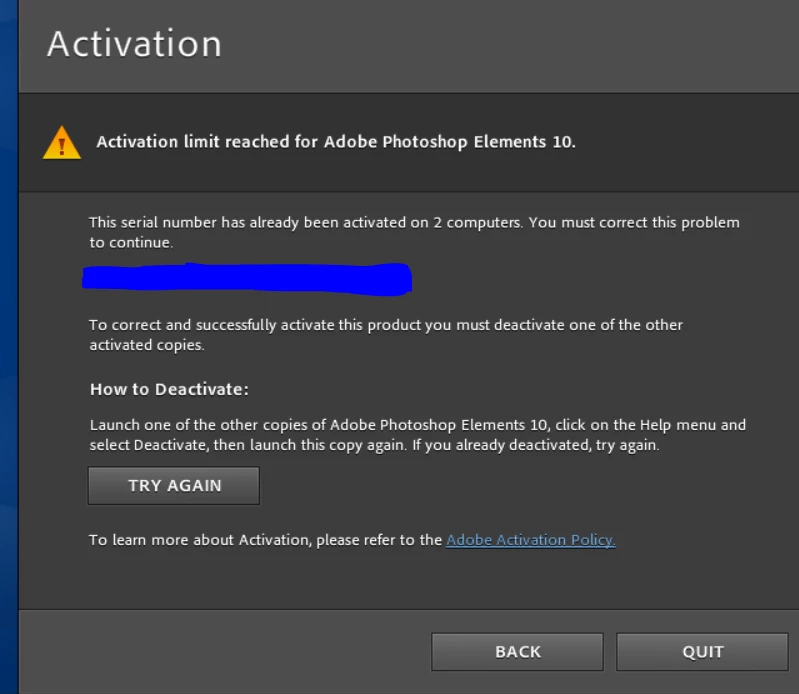
Installing failure when trying to install on my new computer

I installed Photoshop Element 10 on my new computer and deactivated it on my old computer but it still gave me this error. I do not have any other computer where it could be installed except on my old computer. Please if there is some one who can help!
 

This topic is closed to new replies. Start a new post to keep the conversation going.

4 replies

Greg_S.
Community Expert
Community Expert
Dec 10, 2024 7:23 PM UTC

Here is a link to the Elements 2025 purchase page.  As a prior user, you are entitled to the discounted upgrade price.  However, at this time of year, you may be able to find a cheaper price at other retailers. 


Please note that Elements 2025 is no longer a perpetual license.  It is a 3 year term license.  We have been told that the Elements 2025 Organizer will continue to work, after the license expires.

Translate
Greg_S.
Community Expert
Community Expert
Dec 9, 2024 7:42 PM UTC

Try using the activate offline method described in this HelpX article.  Although it refers to Elements 2019, it should also work with Elements 10.

I try not to spend other people's money, but Elements 10 is about 13 years old.  You may want to consider updating to a newer version of Elements for your new computer.  There have been many new features and improvements since Elements 10 was released.

Translate
Participant
Dec 10, 2024 12:55 PM UTC

Thank you, Greg, do you have a link for me if I upgrade? 

Translate
Derek Cross
Community Expert
Community Expert
Dec 9, 2024 12:00 PM UTC

It's best to post on the Adobe Photoshop Elements forum, this is the Photoshop forum.

https://community.adobe.com/t5/photoshop-elements/ct-p/ct-photoshop-elements?page=1&sort=latest_replies&filter=all&lang=all&tabid=discussions

Translate