
dirkb66660831
Participant
February 27, 2018
Answered

Installing PE - Fatal Error: central directory not found

  • February 27, 2018
  • 1 reply
  • 515 views

Hi,

I bought the latest PE a couple of days ago on Amazon - Adobe Photoshop Elements 2018 & Premiere Elements 2018 [Mac Download]    .

The software downloaded successfully, but upon trying to install I got the message "Fatal Error: central directory not found".
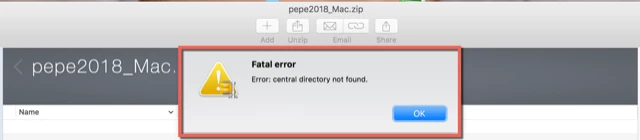
This happened when WINZIP tried to unzip the downloaded file pepe2018_MAC.zip

I deleted the file in case it was corrupted and downloaded it again. I also deleted WINZIP and re-installed it.

I "restarted" my Laptop.

No success.

I am using a MacBook Pro with a 250 Gb SSD with about 60Gb free storage

Memory 8Gb memory

OS - Sierra 10.13.3

Can anyone please advise me on how to resolve this issue as I cannot get my money back from Amazon.

Thanks in advance for the help.

Dirk

This topic has been closed for replies.
Correct answer Little_Pale_Face

Hi,

I'm not a MAC person so someone may have a better solution.

It is most likely that there is a problem in the download file, did you download it from Amazon?

You could try downloading it from Adobe - try Photoshop elements first

Download Photoshop Elements | 2018, 15, and 14

At the end of that page is a link for premiere elements.

Good luck

Brian

1 reply

Little_Pale_Face
Little_Pale_FaceCorrect answer
Inspiring
March 22, 2018

Hi,

I'm not a MAC person so someone may have a better solution.

It is most likely that there is a problem in the download file, did you download it from Amazon?

You could try downloading it from Adobe - try Photoshop elements first

Download Photoshop Elements | 2018, 15, and 14

At the end of that page is a link for premiere elements.

Good luck

Brian