
DC Urbanite
Participating Frequently
October 21, 2023
Answered

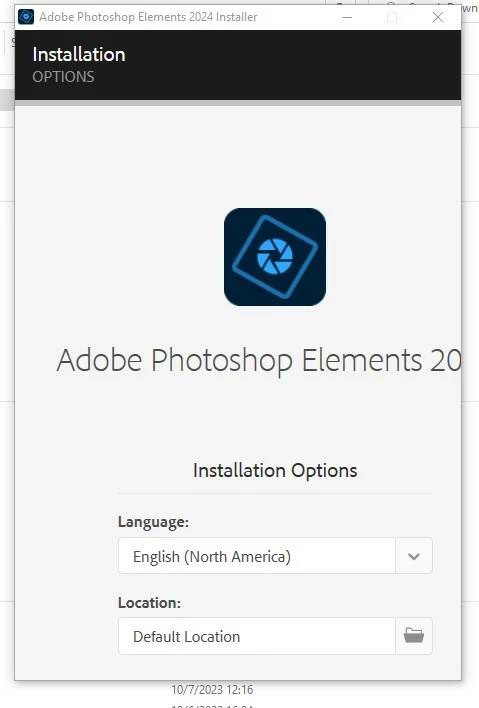
Installing PSE 2024, Options window cut off

  • October 21, 2023
  • 1 reply
  • 470 views

I just downloaded PSE 2024 and tried to install (Windows 10 64bit).  First thing it gave me is an Installation Options window with Language, Location etc. There are probably other options and the button to continue, but they are cut off (See screenshot).  The window is fixed size and can't be resized or maximized, so I am stuck.
This topic has been closed for replies.
Correct answer Greg_S.

Press the Tab key and it will take you to the next box to enter information or to the Click OK button.

1 reply

Greg_S.
Community Expert
Greg_S.Community ExpertCorrect answer
Community Expert
October 21, 2023

Press the Tab key and it will take you to the next box to enter information or to the Click OK button.

DC Urbanite
Participating Frequently
October 21, 2023

Thanks.  That got me past that window.  The next window, which showed new features was similarly cut off and I tried to tab my way through.  After some repeat attempts at installation, I discovered that the software had been installed after I got through the first window.  Problem is solved for me, but Adobe should still fix.  Thanks again.