
Participating Frequently
December 30, 2018
Question

Is PSE 2019 free trial a full working copy? I cant get Guided Edits

  • December 30, 2018
  • 1 reply
  • 1244 views

I have just downloaded PSE 2019.  I used to use PSE many years ago until my version (4) was no longer supported by whatever version of Windows I was on.

Anyway, I wondered if the 30 day free trial version was a full working copy.  I am interested in the guided edits and watched many tutorials but my screen looks nothing like theirs!  I am puzzled and wonder if I need to tick something somewhere, or is it not even there at all?  I am not going to risk paying out if half the options don't work.#

Here is a screen shot of what I get:
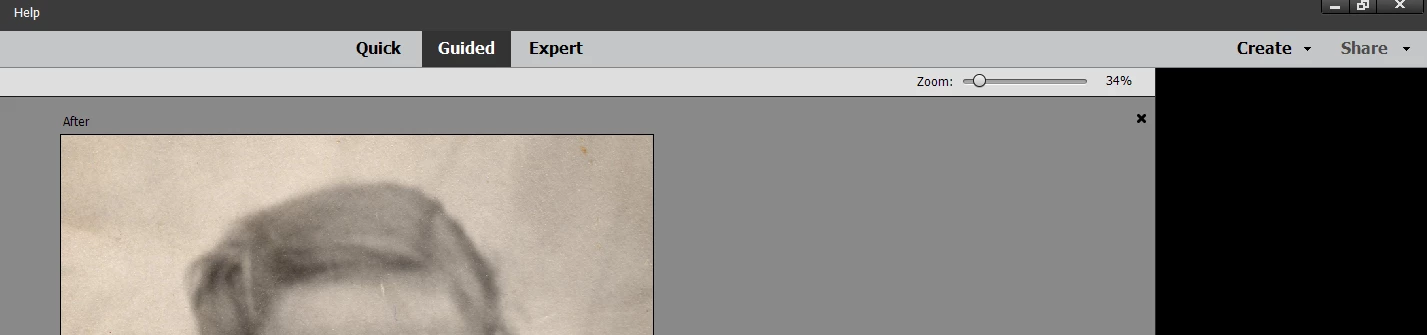
As you can see, I don't have any choices like the Fun Edits and Special Edits that are on all the tutorials.  What am I doing wrong?

Any help gratefully accepted

    This topic has been closed for replies.

    1 reply

    99jon
    Legend
    December 30, 2018

    The trial is the full version. It looks like you already have an open image. Try closing or re-launching the Editor. Then go to Guided.

    Choose one of the tabs and then choose a guided edit. Then open an image.

    Greg_S.
    Community Expert
    Community Expert
    December 30, 2018

    It looks to me like you are already in a Guided Edit. You need to cancel out of it and the other Guided Edits will become available.  If that isn't the case, how did you open the picture that is shown in your screen shot? Did you try one of the tutorial cards that is found on the Home Screen?

    A grab of the entire screen would be helpful.

    Participating Frequently
    December 31, 2018

    Hi

    I have closed right out, re opened PSE.  This is the screen I get, after choosing photo editor from the Home screen, is

    As you can see, there is nowt there!!  I haven't opened any images or done anything else!

    Should I have done something different from the home screen, perhaps?