
Inspiring
July 24, 2017
Answered

Is there an add on for frames etc.

  • July 24, 2017
  • 3 replies
  • 1988 views

For many years I used an add on into Elements called OnOne, until during a recent Windows update, it no longer works in Windows 10.

This was a terrific add on with hundreds of frames, as well as other effects, but it seems the company no longer exists.

Are there any other add on similar add ons, free or to pay for, for weddings, effects etc?

Thanks.
    This topic has been closed for replies.
    Correct answer hatstead

    Are there any other add on similar add ons, free or to pay for, for weddings, effects etc?

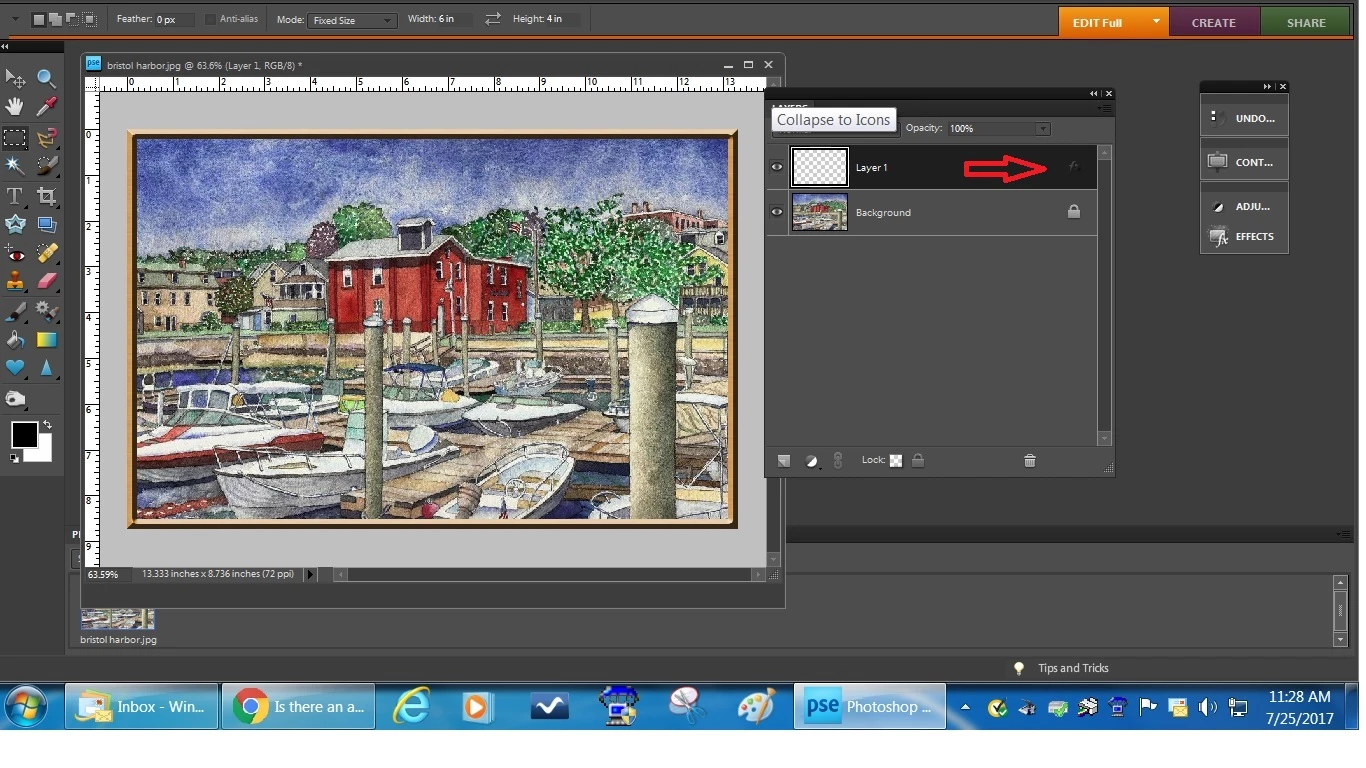
    You can also make your own frame(s) quite readily. Try this:

    1. Open your picture file
    2. Go to Select>all
    3. Open a blank layer above the background layer
    4. Go to Edit>Stroke(outline) selection. Place stroke inside. Color does not matter. Here I used 15px stroke (experiment)
    5. Open the Effects palette, and in the drop-down select Patterns. I used Wood. Apply
    6. Still in the Effects palette, select Bevels. I used Scalloped Edge. Apply
    7. Double click on the f (see red arrow) on the layer with the stroke (Layer 1) to bring up the Style Settings dialog. Here you can fine-tune the bevel, etc.

    3 replies

    hatstead
    hatsteadCorrect answer
    Inspiring
    July 25, 2017

    Are there any other add on similar add ons, free or to pay for, for weddings, effects etc?

    You can also make your own frame(s) quite readily. Try this:

    1. Open your picture file
    2. Go to Select>all
    3. Open a blank layer above the background layer
    4. Go to Edit>Stroke(outline) selection. Place stroke inside. Color does not matter. Here I used 15px stroke (experiment)
    5. Open the Effects palette, and in the drop-down select Patterns. I used Wood. Apply
    6. Still in the Effects palette, select Bevels. I used Scalloped Edge. Apply
    7. Double click on the f (see red arrow) on the layer with the stroke (Layer 1) to bring up the Style Settings dialog. Here you can fine-tune the bevel, etc.

    Jeff Arola
    Community Expert
    Community Expert
    July 25, 2017

    What version of photoshop elements do you have?

    You can get the free OnOne Effects 10.5 which has quite a few borders and tons of other kinds of presets.

    https://www.on1.com/products/effects10/

    Photoshop elements has a variety of Frames under Window>Graphics>Frames.

    Inspiring
    July 26, 2017

    Many thanks for this.  Did not realise that they seem to have changed the name to ON1!

    I will now ponder whether to say with the free version or the paid version.

    Peru Bob
    Community Expert
    Community Expert
    July 25, 2017

    Lots of free frames here:

    *WARNING* Don't click on any of the green "Download" buttons or you will download PUPs..  Double click the frame, then right click and choose "Save image as."

    Free Photo Frames | Download Frames, Photo Frames, Picture Frames | Page: 1