
Inspiring
July 21, 2017
Answered

Is there by any chance a way to automatically put the name of the photo as text

  • July 21, 2017
  • 2 replies
  • 394 views

I have a lot of photos that I have loaded and named with the Microsoft loader. I see that I can print the photos with the name below it but what would be even better would be if this was Text on the photo. But to do all of these manually would be a BIG job. Is there by any chance away of doing this in bulk!! Chris
    This topic has been closed for replies.
    Correct answer Jeff Arola

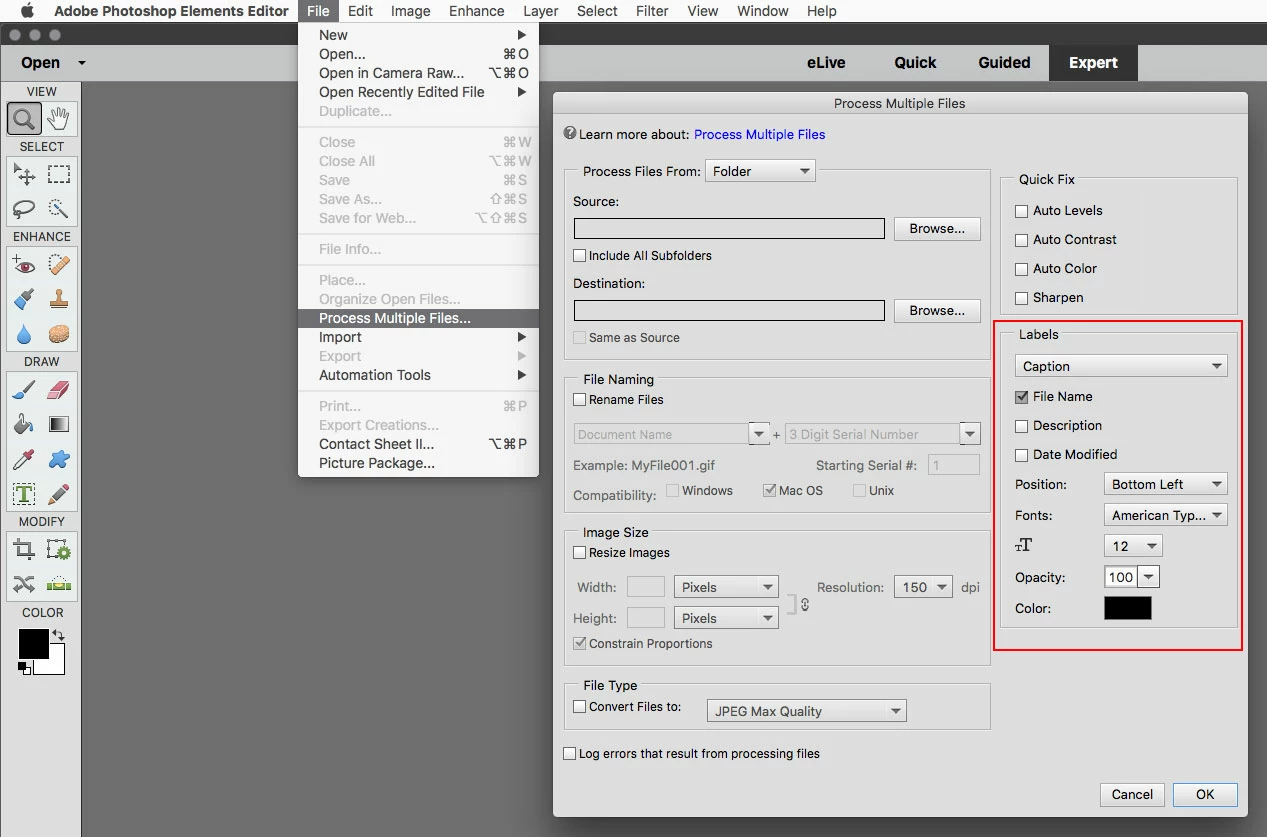
    Take a look at File>Process Multiple Files in the photoshop elements editor.

    https://helpx.adobe.com/photoshop-elements/using/opening-files.html#process_multiple_files

    2 replies

    hatstead
    Inspiring
    July 21, 2017

    Chris@Badgers  wrote

    I have a lot of photos that I have loaded and named with the Microsoft loader. I see that I can print the photos with the name below it but what would be even better would be if this was Text on the photo. But to do all of these manually would be a BIG job. Is there by any chance away of doing this in bulk!! Chris

    Is the text that you wish to apply to the photos unique to each one, or, is the text the same for a group of photos?

    Jeff Arola
    Community Expert
    Jeff ArolaCommunity ExpertCorrect answer
    Community Expert
    July 21, 2017

    Take a look at File>Process Multiple Files in the photoshop elements editor.

    https://helpx.adobe.com/photoshop-elements/using/opening-files.html#process_multiple_files

    Inspiring
    July 23, 2017

    R Kelly That Is awesome!!! Never thought that would be possible. As I have already changed each file name to what I want on the photo, it applies that, by selecting "File name", allowing each photo to have the unique text on it. Automatically Thank you very much. Chris