
Participating Frequently
February 21, 2019
Question

Issue opening NEF files, which used to open earlier..

  • February 21, 2019
  • 1 reply
  • 1166 views

Hi,

I used to open and edit NEF ( Nikon Raw format) files, in Photoshop elements 14. Never had an issue.

A couple of days back, in a rush, I used the option "Process Multiple Files" to save time … The Photoshop process stopped after one file conversion. I repeated the processing, selecting the option to log defects in destination folder. Since then, Photoshop stopped opening any NEF File ( throwing an error popup screen stating
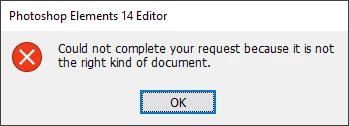
And the Log file has multiple lines with the following error message against each file

Error: Could not complete your request because Photoshop Elements  cannot recognize the file extension. (-25600)

Trying to fix, I have tried

1. Re-install Photoshop elements 14 from Disc

2. Uninstall / Reinstall Photoshop elements 14from Disc

3. reset Windows 10 OS and then reinstall Photoshop

4. Download and install Photoshop elements 14

5. Posted in ACR ( Adobe Camera Raw) forum but was asked to come here since they didn't think it was an error with Camera Raw

None of the approaches have worked so far.. Please assist

This topic has been closed for replies.

1 reply

Greg_S.
Community Expert
Community Expert
February 21, 2019

When you uninstalled, did you choose the option to delete user preferences?  (I'm not sure of the exact wording.)  If not, delete the preferences files.  In the Edit>Preferences>General dialog, you can select Reset preferences on next launch.

If that doesn't work, I have to ask whether you have a new Nikon camera. Not all NEF files are created equally.  ACR is continually updated to handle newer cameras, and at a certain point Elements cannot be updated to the latest version of ACR.

Participating Frequently
February 21, 2019

Thanks Greg

I have done both routes, and still face the issue..

Further still, the files I am referencing were opening fine before. So it

feels like the "process multiple files" option has corrupted the raw files.

MichelBParis
Legend
February 21, 2019

I don't use NEF files, but the only reported situation in which raw files had been found to be really corrupted was a few years ago when the Nikon transfer program did create the issue. To be sure, does the issue persists with recent NEF files from your camera?