
Answered
Kan inte avinstallera Photoshop Elements 2018
This information was sent to me from Support,
First uninstall all Adobe related products and Adobe creative cloud desktop application, then restart your computer and download and install Acrobat Pro 2020.
When uninstall Acrobat Pro 2000 and Photoshop Elements 2025 it works well but for Adobe Creative Cloud and Photoshop Elements 2018 I get this message,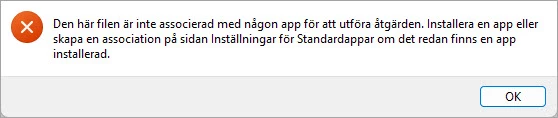
Translated:
This file is not associated with any app to perform the action. Install an app or create an association on the Default Apps Settings page if an app is already installed.
I can't find out how to do this.
/R²


 AdChoices