
Participant
October 8, 2022
Answered

Keine Vorschau beim Importieren von Canon Raw Dateien (cr2) in Photoshop Elements 2022

  • October 8, 2022
  • 1 reply
  • 368 views

Hallo,

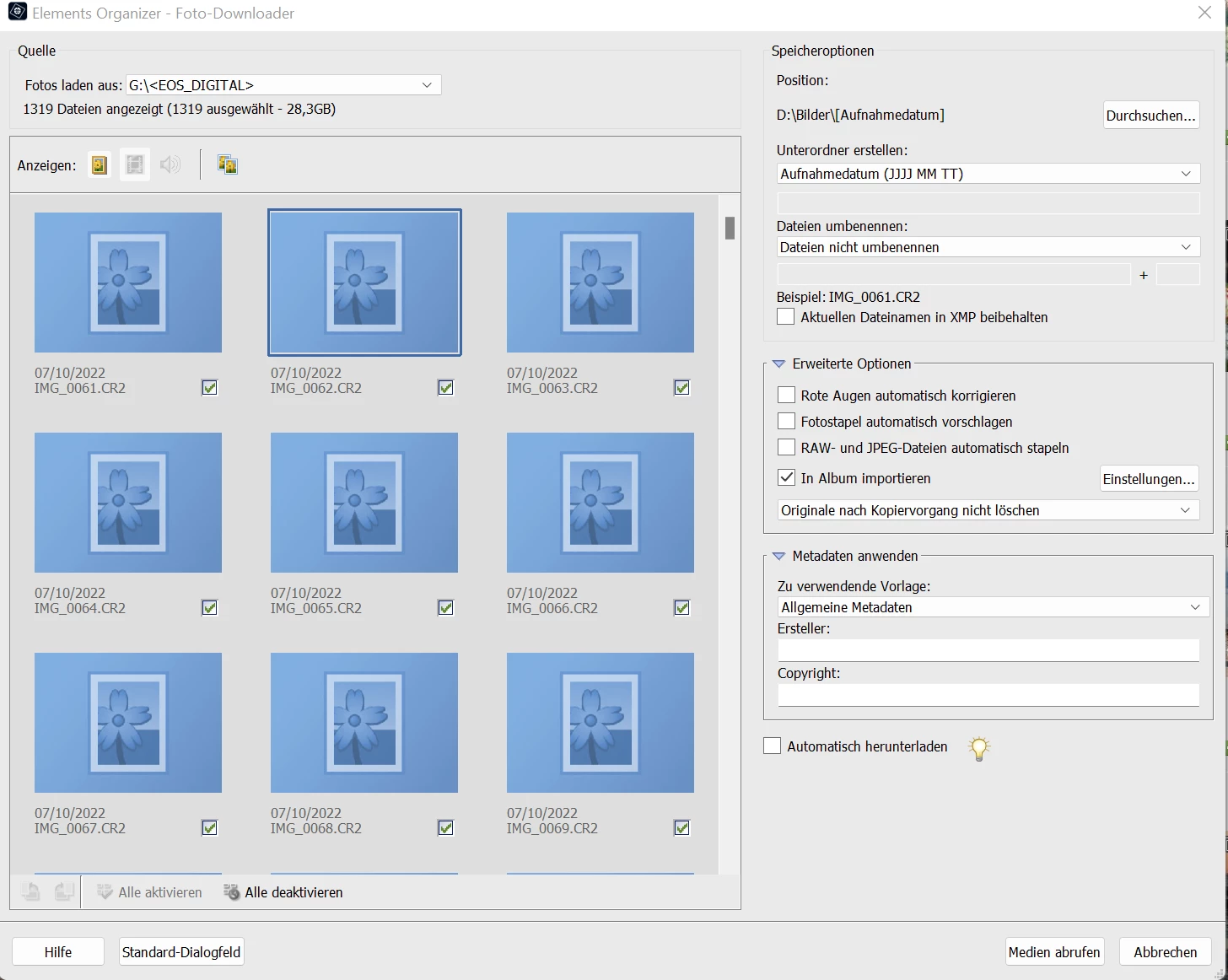
ich habe das Problem, dass ich beim Importieren von RAW-Dateien in Photoshop Elements 2022 über "Datei -> Fotos und Videos laden -> Aus Kamera und Kartenleser" keine Vorschau der Bilder angezeigt bekomme. Es werden nur Platzhalter angezeigt. Bei jpgs wird eine Vorschau dargestellt. Kann ich das irgendwo einstellen, damit ich die zu selektierenden Bilder als Vorschau sehen kann?


Vielen Dank für eure Hilfe und viele Grüße

Gerd Hildebrand

This topic has been closed for replies.
Correct answer Greg_S.

This is a random problem that probably happens because of hardware/RAM issues.  I notice that you are importing over 1300 files from your camera.  It probably takes an enormous amount of memory to preview those raw files.  You may also notice that there are no thumbnails for video files which is the intended behavior.  I'm afraid you will have to import the files and cull them from the catalog if that is your reason for viewing the thumbnails.

1 reply

Greg_S.
Community Expert
Greg_S.Community ExpertCorrect answer
Community Expert
October 10, 2022

This is a random problem that probably happens because of hardware/RAM issues.  I notice that you are importing over 1300 files from your camera.  It probably takes an enormous amount of memory to preview those raw files.  You may also notice that there are no thumbnails for video files which is the intended behavior.  I'm afraid you will have to import the files and cull them from the catalog if that is your reason for viewing the thumbnails.

Participant
October 19, 2022

Hello,
many thanks for your help. It worked like this.
Unfortunately I didn't have time to test it before, so I only got in touch now.
Best regards and thanks again.
Gerd