
Participant
May 4, 2023
Answered

Loading photos to PSE 2021

  • May 4, 2023
  • 2 replies
  • 776 views

I open PSE 2021> go to Photo Editor> click on Quick/Guided/Expert> Edit> Open in Camera Raw> click on a photo> the photo then overlays the editor. How do I get the photo to fit into the Q/G/E format so I can edit it?
This topic has been closed for replies.
Correct answer Greg_S.

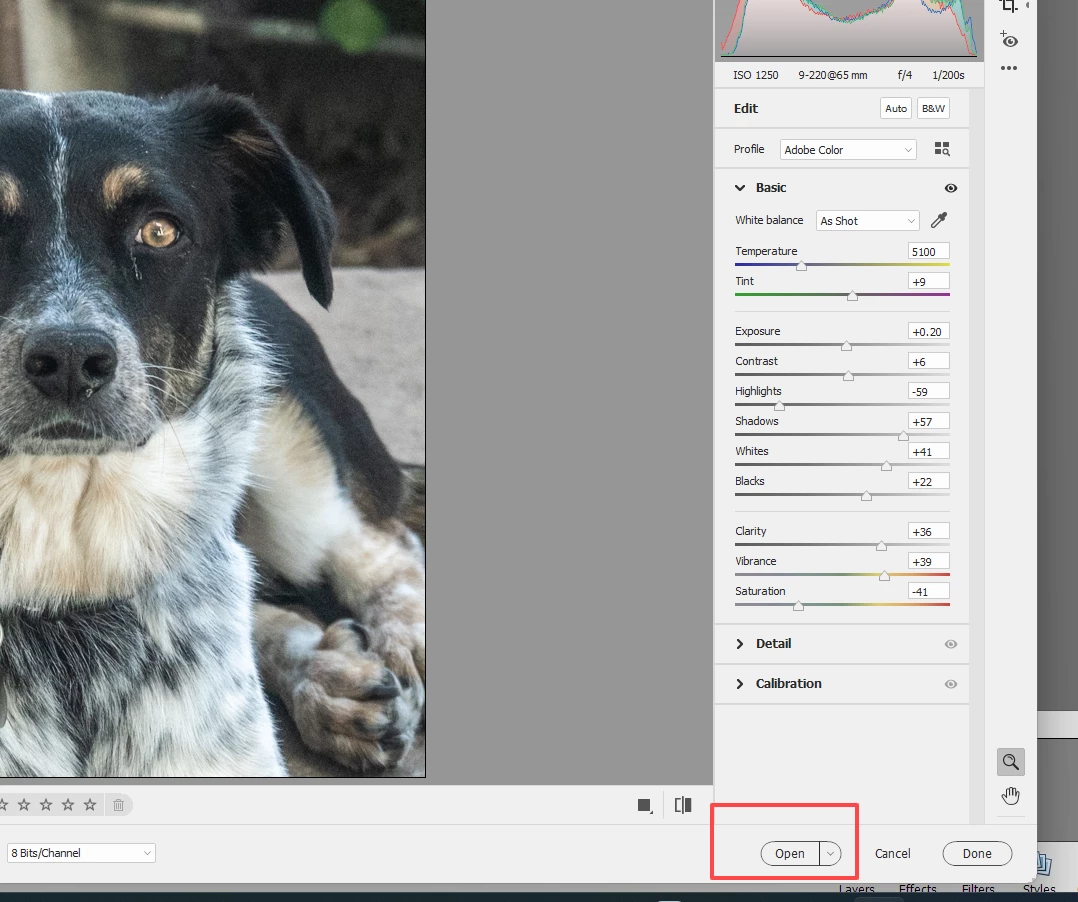
Click on the Open button in the Adobe Camera Raw editor and the image will open in the Photoshop Elements Editor:


2 replies

Greg_S.
Community Expert
Community Expert
May 8, 2023

What happens when you try to use a Guided Edit? Does any message pop up?  A photo has to be open in Quick or Expert modes before you can launch a Guided Edit. 

Participant
May 8, 2023

I DL a photo to Quick, then clicked on expert which has the photo in the edit mode, also. When I back up to the Guided m ode, it only shows a bunch of mini screens as Brightness/Contrast, etc. I clicked on B/C and it came up with the item needed to edit the photo. Seems that Guided is for special editing. I did choose to remove an object. Clicked on that particular mini, used the lasso and followed the yellow brick road, i.e., the steps. Bingo! The object was deleted. As I said, I haven't used PSE in a while and forgot the steps needed for editing. I'm going to practice as I have photos with multiple exposures so if one is lost in the ethereal realm, I still have others. Again, many thanks for your help. 

Greg_S.
Community Expert
Greg_S.Community ExpertCorrect answer
Community Expert
May 4, 2023

Click on the Open button in the Adobe Camera Raw editor and the image will open in the Photoshop Elements Editor:


Participant
May 7, 2023

Haven't used PSE in a while but need to review and edit a sackful of photos. I followed " the yellow brick road" and Bingo! There it was. Many thanks for your reply and instructions. This will probably not be the last inquiry I'll make with the community.