Participant
November 24, 2024
Answered

Marquee tool

  • November 24, 2024
  • 4 replies
  • 365 views

I always use rectanuglar marquee, but it has suddenly switched to elliptcial and I cannot find how to change it back to rectangular. How do I do that?

This topic has been closed for replies.
Correct answer Greg_S.

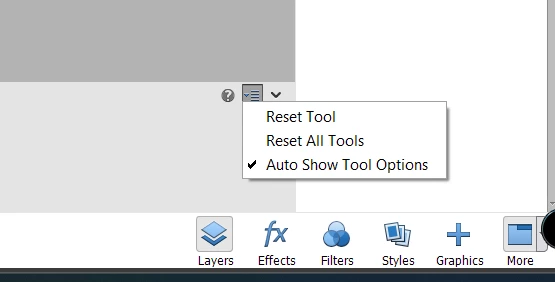
Try resetting the tool in the Tool Options bar.  With the marquee tool selected, click on the hamburger icon at the right hand side and choose Reset Tool.


4 replies

Greg_S.
Community Expert
Community Expert
November 24, 2024

. . .  and are you using a wireless mouse?  Try changing the batteries.

Greg_S.
Community Expert
Greg_S.Community ExpertCorrect answer
Community Expert
November 24, 2024

Try resetting the tool in the Tool Options bar.  With the marquee tool selected, click on the hamburger icon at the right hand side and choose Reset Tool.


Participant
November 24, 2024

Brilliant, done! Many thanks Greg.

Greg_S.
Community Expert
Community Expert
November 24, 2024

What version of Elements are you using?  In recent versions, you will find a button for the rectangular marquee next to the eliptical marquee in the Tool  Options:


Participant
November 24, 2024

Thanks Greg, I amusing Elements 2023 and it does have those buttons Rectangular is selected, but in the middle of editing it changed to eliptical, although the rectangular button is still selected. I have tried toggling between the two but it still gives me eliptical.

Glenn 8675309
Legend
November 24, 2024

Participant
November 24, 2024

Thanks Glenn, I have trued that. Eliptical is what I am getting , even though the rectangular button shows that it is selected.