Known Participant
October 2, 2022
Answered

Method of copying a group from one image to another

  • October 2, 2022
  • 1 reply
  • 265 views

I'm looking for a method whereby I can copy a pair of direction arrows labelled with N and E from one psd file (the stock file) to another psd file (the working file). As my first attempt to make a stock file, I have set up a transparent background image, and generated the arrows and labelled them. However, I find that none of these elements are copy-able (Edit>Copy of any type is disabled - greyed out). If I group them, the same situation exists.


Is there a way of doing this in PE 2022? I was hoping to have a stock file with these direction arrows and their labels set up so that all I need do is copy from this file into my working file. As I expect to have quite a number of these to do in the next 12 months (>15), it would be a lot more efficient to do it this way than to re-create the arrows for each working file.


My thanks in advance, Paul.

This topic has been closed for replies.
Correct answer Greg_S.

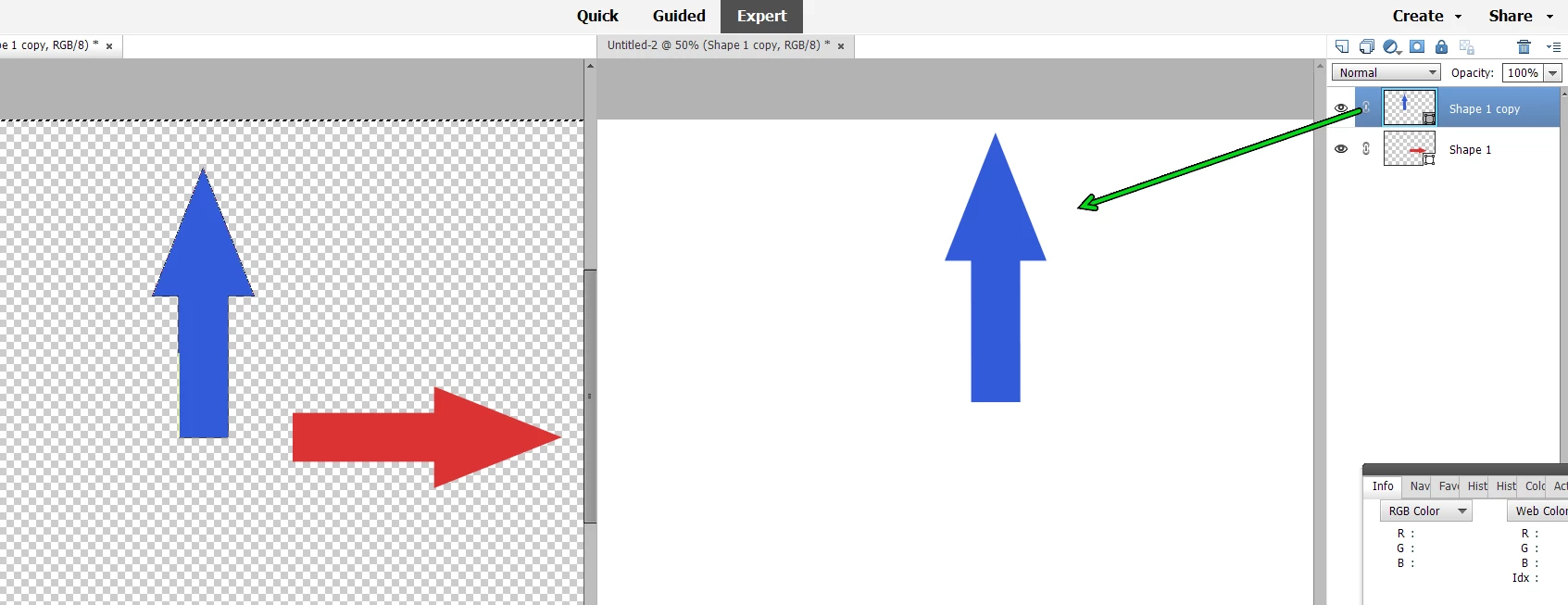
Here is one method:


  1. Tile the working and stock files, using the Window>Images>Tile command.
  2. Select the stock file
  3. Drag the layer(s) or group of layers to the working file.


1 reply

Greg_S.
Community Expert
Greg_S.Community ExpertCorrect answer
Community Expert
October 2, 2022

Here is one method:


  1. Tile the working and stock files, using the Window>Images>Tile command.
  2. Select the stock file
  3. Drag the layer(s) or group of layers to the working file.


cplloyd42Author
Known Participant
October 2, 2022

Greg_S, you are brilliant!!!


It works, so long as you drag the group layer (highlighted in blue) and not the group on the image/editing pane, as you show in your lucid diagram.


Thank you, thank you. I've been puzzling over this issue for days. I consider this issue now resolved.


Kind regards, Paul.