
Participant
July 30, 2018
Answered

Missing Camera Raw Tools

  • July 30, 2018
  • 1 reply
  • 2333 views

I have the non-subscription version of Photoshop 2018 with the Camera Raw 10.4 plug in installed. I'm trying to learn how to use the quick edit tools for Camera Raw but the Graduated Filter Tool and Local Adjustment Brush Tool do not appear in the toolbar (see below).
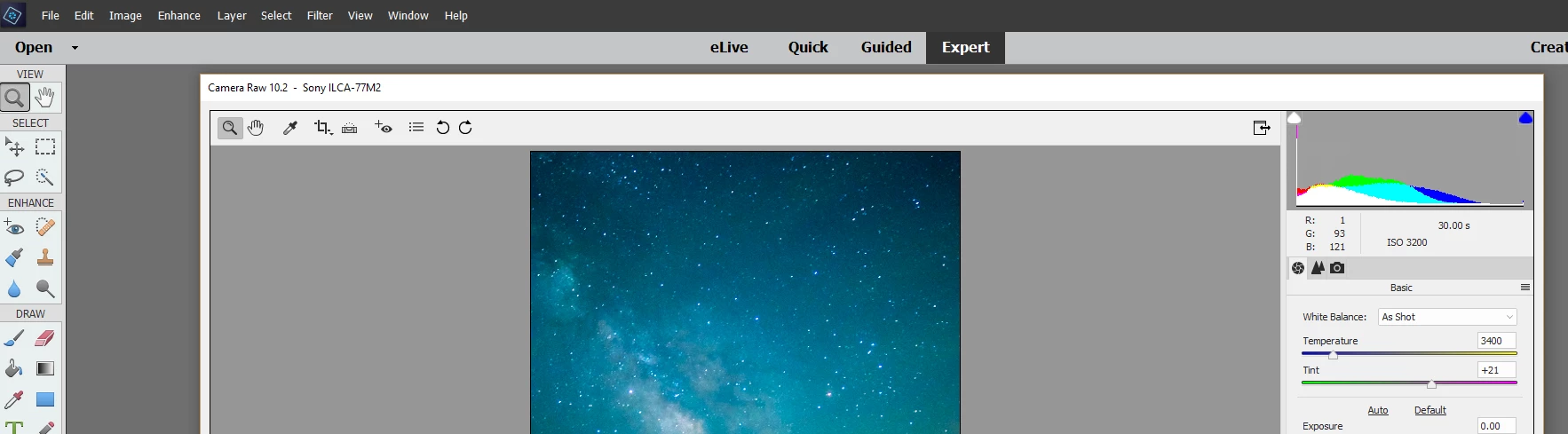
Is there some menu setting or preference I need to enable in order to get these tools in the toolbar?

Thanks in advance!

This topic has been closed for replies.
Correct answer 99jon

Photoshop Elements has always had a basic set of raw tools compared with Photoshop CC Lightroom Classic CC and Lightroom CC. But those applications are only available by subscribing to a photography plan or single app plan.

https://www.adobe.com/creativecloud/photography.html

1 reply

99jon
99jonCorrect answer
Legend
July 30, 2018

Photoshop Elements has always had a basic set of raw tools compared with Photoshop CC Lightroom Classic CC and Lightroom CC. But those applications are only available by subscribing to a photography plan or single app plan.

https://www.adobe.com/creativecloud/photography.html

Participant
July 30, 2018

Thanks! I thought as much. Now I can stop looking.