
Participant
September 11, 2023
Answered

Missing functions in PSE 2023

  • September 11, 2023
  • 2 replies
  • 3168 views

A long time user of PSE 08, recently upgraded to PSE 2023. The thing that sold it to me was the Cylinder Warp function, (which after a web search, even on the Adobe official site, I was assured that this function was included). a hundred bucks later I opened the workspace to find the Cylinder option missing from the warp menu?! Have I been lied-to, or mis-sold this product? ...Or am I missing something obvious to others in this forum, but obscured to me? I'd hate to think I've just wasted my money, but it seems I may as well as stuck to my old PSE 08. I bought PSE '23 specifically for this function.
This topic has been closed for replies.
Correct answer Jeff Arola

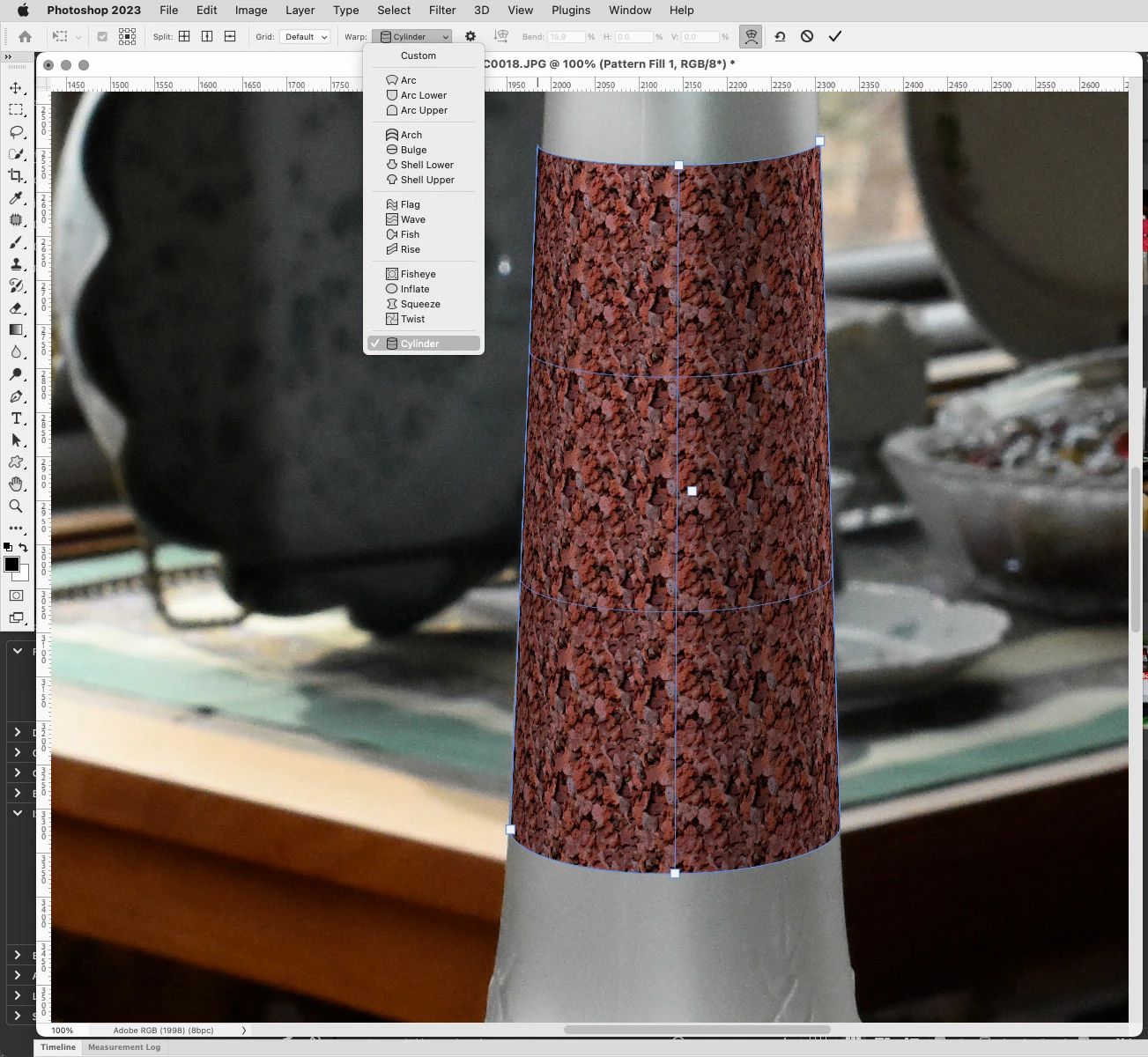
While photoshop elements 2023 does indeed have Transform Warp, a new addition in pse 2022, there is unfortunately not the Cylinder option like there is in photoshop cc, perhaps because that was just introduced a few versions (updates) ago in photoshop cc 2022 and adobe feels the feature is too new for photoshop elements.


I don't think you wasted your money since there are many other features that pse 8 doesn't have and better compatibility with newer operating systems, such as being 64 bit so ram usage can exceed the 32 bit limit of 1.8 gb that pse 8 has.


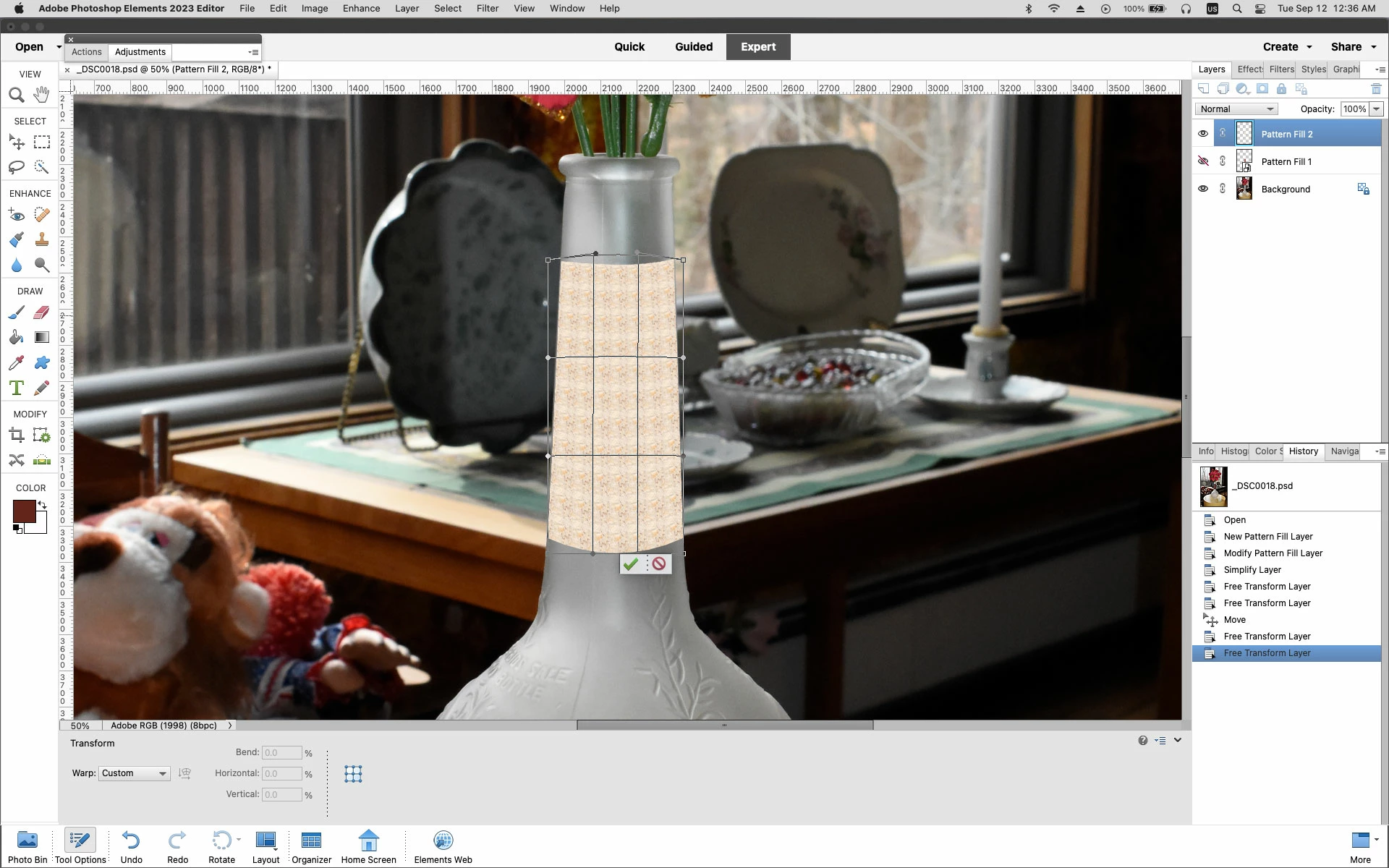
You can still use the existing Transform and Transform Warp options to put something on a cylinder  or cylinder like object.


Photoshop 2023 Warp>Cylinder option


photoshop elements 2022 Transform>Warp


2 replies

Jeff Arola
Community Expert
Jeff ArolaCommunity ExpertCorrect answer
Community Expert
September 12, 2023

While photoshop elements 2023 does indeed have Transform Warp, a new addition in pse 2022, there is unfortunately not the Cylinder option like there is in photoshop cc, perhaps because that was just introduced a few versions (updates) ago in photoshop cc 2022 and adobe feels the feature is too new for photoshop elements.


I don't think you wasted your money since there are many other features that pse 8 doesn't have and better compatibility with newer operating systems, such as being 64 bit so ram usage can exceed the 32 bit limit of 1.8 gb that pse 8 has.


You can still use the existing Transform and Transform Warp options to put something on a cylinder  or cylinder like object.


Photoshop 2023 Warp>Cylinder option


photoshop elements 2022 Transform>Warp


Participant
September 12, 2023

Thanks, Jeff. You're right about the tools and processing probably being a much needed upgrade on my older version. 

I'm creating a platform-view of a London Underground tube/metro/subway station, and seperate images for use as posters adorning the walls. (London's deeper stations have cylindrical curved walls). ...And I just knew from long experience that the old PSE8 Perspective/skew/distort tools would never achieve the desired effect, so, as mentioned earlier, before upgrading I did a preliminary search, and was assured by some search results that the feature was included, even watching a couple of Youtube tutorials with titles that seemed to confirm the other search results, (it's a minefield out there). 

Anyway, I guess I shall see if  I can use the "Bridge" warp tool first, to see If I can invert the arches, and to be honest, I  even had doubts that the Cylinder tool may not have inversion capabilities, (concave) had it been included. I shall experiment. 

Thanks again for taking the time to answer my query, and the good advice!

Greg_S.
Community Expert
Community Expert
September 12, 2023

The Warp tool is found under the Image>Transform menu:


I agree it's not particularly obvious to find.

Participant
September 12, 2023

Thanks Greg. I was just a little disappointed that aside from all the other warp tools, "Cylinder" didn't appear in the drop-down menu along with the other styles. Have since learned it's not included in PSE 2023. Thanks again!