
kathleens49641516
Participant
December 27, 2022
Answered

Moving Elements - Adobe Photoshop Elements 2023 Is Broken

  • December 27, 2022
  • 2 replies
  • 695 views

Hello,


I just got Adove Photoshop Elements 2023. When I attempt to add moving elements, whatever I select just goes solid grey when I go to play the effect. Any ideas on what to do?


Thanks.


KLS

This topic has been closed for replies.
Correct answer Greg_S.

@kathleens49641516 , this is very likely a graphics card driver issue.  (I assume you are on Windows.)


Try the following:


  • Close Elements
  • Go to Device Manager (in Windows Control Panel)
  • Expand the menu for Device Adapter
  • Double-click on each Graphics card that is displayed (you may have more than one)
  • In the dialog that pops up, click on the Drivers tab
  • Click the Update button and choose to Search Automatically

If you get a message that you already have the best driver available, go to the manufacturer's website and download and install the latest driver for your Graphics card.


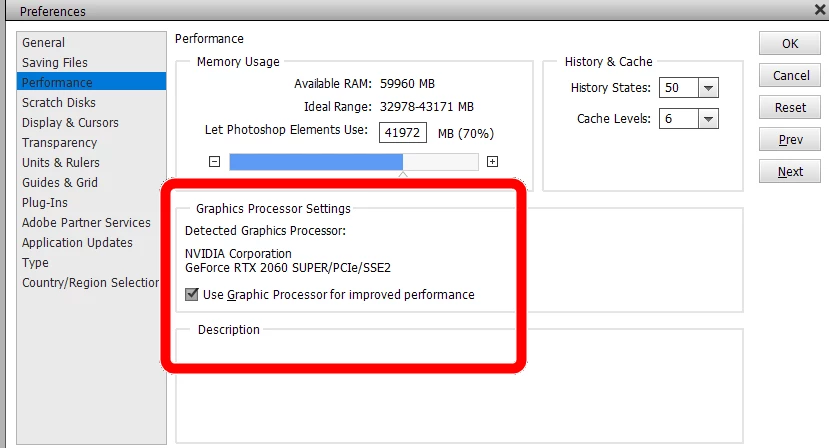
If that doesn't fix the problem, try going to the Editor's Edit>Preferences>>Performance dialog and change the setting of the checkbox for Use Graphics Processor for Improved Performance.


2 replies

Greg_S.
Community Expert
Community Expert
December 27, 2022

@kathleens49641516, updating the driver or changing the setting?

Participant
August 21, 2023

THANKS! I had the same problem with "moving elements" and changing the setting in PSE 2023 solved the problem,

Greg_S.
Community Expert
Greg_S.Community ExpertCorrect answer
Community Expert
December 27, 2022

@kathleens49641516 , this is very likely a graphics card driver issue.  (I assume you are on Windows.)


Try the following:


  • Close Elements
  • Go to Device Manager (in Windows Control Panel)
  • Expand the menu for Device Adapter
  • Double-click on each Graphics card that is displayed (you may have more than one)
  • In the dialog that pops up, click on the Drivers tab
  • Click the Update button and choose to Search Automatically

If you get a message that you already have the best driver available, go to the manufacturer's website and download and install the latest driver for your Graphics card.


If that doesn't fix the problem, try going to the Editor's Edit>Preferences>>Performance dialog and change the setting of the checkbox for Use Graphics Processor for Improved Performance.


kathleens49641516
Participant
December 27, 2022

Worked like a charm. Thank you so much!