Participant
May 28, 2024
Answered

MSVCP120.dll STILL missing after Visual C++ reinstalls

  • May 28, 2024
  • 4 replies
  • 9051 views

I've just reinstalled Photoshop Elements 2023, after a fresh Win10 reinstall.  Photo editor will not launch, and is giving me the "missing MSVCP120.dll" error.

Every discussion I've read about this error has the same solution:  uninstall and reinstall newest Visual C++ package.
I've done that, including both the x64 and x86 versions, with restarts between every step.  Still getting the same error.
What are the next steps when this solution doesn't work?
Thanks.

Correct answer Steerpike58

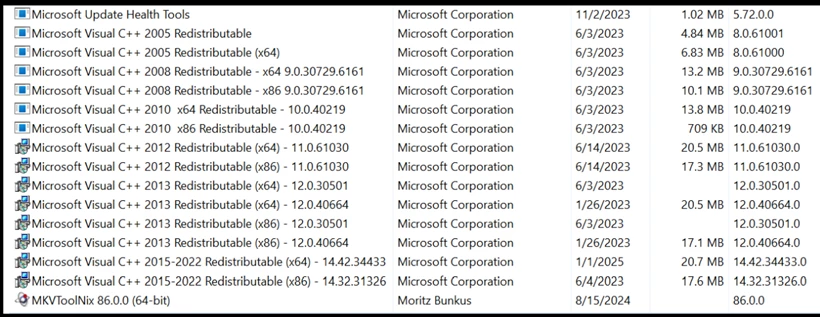
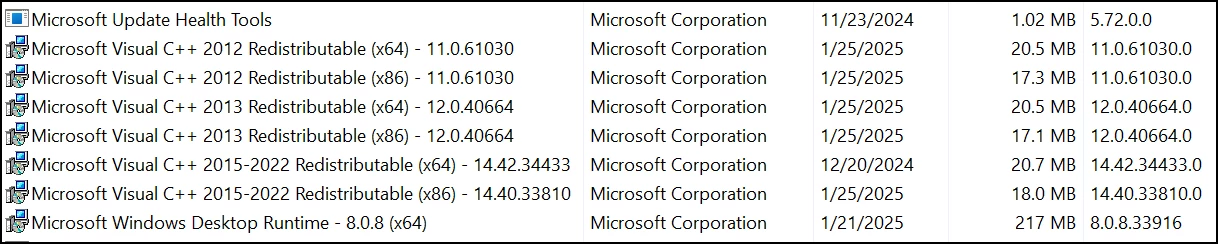
I had the exact same problem on a brand new Win 11 Home laptop.  PE 2023 was working fine on my slightly older Win 11 Home laptop, so I compared (control panel / programs and features) the two sets of Microsoft Visual C++ entries.  Both laptops had the latest MS VC's - "2015-2022 Redistributable" (x86 and x64 versions).  Both had the 2012 versions. But only the working laptop had the 2013 versions, so I found a place to download all the various MS VC components in one go - Latest Visual C++ Redistributable Runtimes All-in-One Nov 2024 Download | TechPowerUp

The recommendation is to install ALL of them, to prevent future issues with other programs, but I installed just the 2013 x86 and x64 versions, and now, PE 2023 runs fine.  Amazing that Adobe does not include this required component in their installation package.  It took me several hours to troubleshoot and solve this. 


Non-working (new) laptop: 

Older, working laptop: 

Fixed new laptop: 


4 replies

Glenn 8675309
Legend
May 29, 2025

Many of you are thinking "Why a 2013 version"?  It's works just fine, many program writers use it becouase it works for their purpose.   That's why it is still around.

here is an AI response:

MSVCP120.dll is part of the Microsoft Visual C++ 2013 Redistributable package, which contains essential functions used by many applications developed with Visual C++. Even though newer versions of Visual C++ exist, some software still relies on older versions for compatibility reasons. If you're encountering a missing MSVCP120.dll error, reinstalling the Microsoft Visual C++ 2013 Redistributable might resolve the issue.

Since you're working with Photoshop Elements, this error has been reported by other users when launching the software, even after reinstalling Visual C++. If reinstalling doesn't work, you might try installing Adobe Creative Cloud before Photoshop Elements, or running the program directly from its executable file. Let me know if you need help troubleshooting!

Glenn 8675309
Legend
May 29, 2025
The Microsoft Visual C++ 2013 Redistributable is still used because many applications, including those built with older versions of Visual Studio, still rely on it. While it officially reached end-of-life support in 2024, it's not always feasible to immediately upgrade software to use newer versions of the redistributable. 
 
Here's a more detailed explanation:
  • Application Dependency:
    Some applications, especially those developed using earlier versions of Visual Studio, were compiled with the 2013 redistributable. These applications still require the 2013 redistributable to function properly. 
     
  • Backward Compatibility:
    Even though newer versions exist, applications may not be designed to automatically switch to a newer version. They might require the specific 2013 version to run, leading to incompatibilities if a newer version is installed. 
     
  • End-of-Life:
    While Microsoft officially discontinued support for the 2013 redistributable on April 9, 2024, many applications and programs are still using it. The support for the 2013 version was officially ended, but many older applications still rely on the redistributable. 
     
  • Migration Costs:
    Upgrading software to use newer redistributables can be a time-consuming and complex process, especially for older applications. This can involve significant testing and code changes. 
     
  • Software Versioning:
    Some software versions are tied to specific redistributable versions. For example, Moldflow 2019 uses the 2010 and 2012 redistributables, while Moldflow 2021 uses 2012 and 2019, according to Autodesk. 
Steerpike58Correct answer
Inspiring
January 26, 2025

I had the exact same problem on a brand new Win 11 Home laptop.  PE 2023 was working fine on my slightly older Win 11 Home laptop, so I compared (control panel / programs and features) the two sets of Microsoft Visual C++ entries.  Both laptops had the latest MS VC's - "2015-2022 Redistributable" (x86 and x64 versions).  Both had the 2012 versions. But only the working laptop had the 2013 versions, so I found a place to download all the various MS VC components in one go - Latest Visual C++ Redistributable Runtimes All-in-One Nov 2024 Download | TechPowerUp

The recommendation is to install ALL of them, to prevent future issues with other programs, but I installed just the 2013 x86 and x64 versions, and now, PE 2023 runs fine.  Amazing that Adobe does not include this required component in their installation package.  It took me several hours to troubleshoot and solve this. 


Non-working (new) laptop: 

Older, working laptop: 

Fixed new laptop: 


Participant
January 26, 2025

Thank you. The 2013 version solves this problem, very good found!

Participant
March 14, 2025

worked for me too

Peru Bob
Community Expert
Community Expert
May 29, 2024

Just a longshot (no harm in trying):

Try installing and updating the Creative Cloud application before installing Photoshop Elements:
https://helpx.adobe.com/download-install/kb/creative-cloud-desktop-app-download.html

CnoctemAuthor
Participant
May 29, 2024

Thanks, I tried that, it made no difference.  The odd thing is, it loaded with no problem just a few weeks ago, on the same version of Windows (different install).  Is there a way to load Photoshop Elements directly, without going through the Adobe loader screen?

Peru Bob
Community Expert
Community Expert
May 29, 2024

Open it from the exe file in Program Files.

Make a shortcut for it.

davescm
Community Expert
Community Expert
May 28, 2024

Hi , I've moved your post from the Photoshop forum to the Photoshop Elements forum where you are more likely to get help relevant to your issue.

Dave