


Participant
March 1, 2021
Question

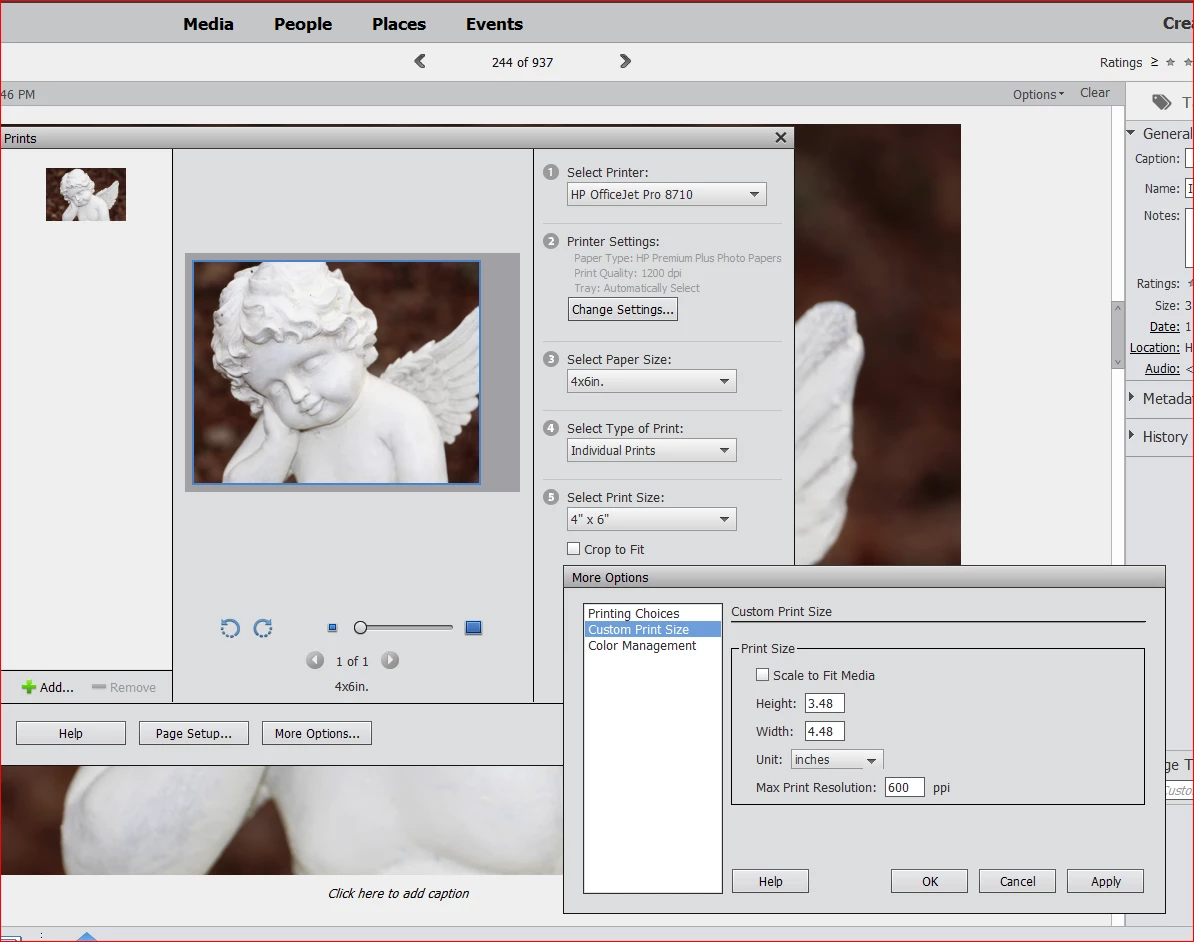
My 4 x 6 photo prints are printing at 3.5 x 5

  • March 1, 2021
  • 2 replies
  • 437 views

[Moderator moved from Using the Community (forums) to Photoshop Elements.]


Hi, I'm trying to print 4 x 6 borderless photos from Adobe Photoshop Elements 2019 to my HP OfficeJet Pro 8715 printer.  I can't find borderless settings (which my printer may not have) but it's not even printing a full 4 x 6 with a border, see the wide gray area on the side and the custom settings won't go larger than 3.48 x 4.48 for some reason.  I had the same printer in an 8600 prior to this one and I didn't have this problem then.  Any help would be appreciated!  Or any recommendations for a good printer that will print 4 x 6 and other size photos borderless.  Thank you in advance!
 

This topic has been closed for replies.

2 replies

Participant
March 2, 2021
Thank you, I saw another post somewhere about adding software for the 8720 and that worked! 
Participant
March 11, 2021

Thanks to both of your for your help.  Adding the software for the 8720 that I first tried worked for borderless photo printing but gave problems for 8.5 x 11 document printing.  I used the link for the HP driver downloads and so far both types print jobs are working!


Thanks again,

Connie

Phil Pickering
Legend
March 1, 2021

It looks like your printer is currently trying to print to the HP 4 x 6.5" photo paper with a tab and not the borderless HP 4 x 6" paper.


If you can't find a borderless setting for your printer, try downloading the "HP OfficeJet Pro 8710 All-in-One Print and Scan Driver and Accessories" under the "Software Utility" section from the HP website:


HP OfficeJet Pro 8715 All-in-One Printer Software and Driver Downloads


It looks like some OfficeJet printers only come with basic drivers and you may need the full set to get borderless printing working.


Not an expert in HP printers at all, but hope that starts to point you in the right direction 🙂


Participating Frequently
March 2, 2021