
Participant
January 7, 2019
Answered

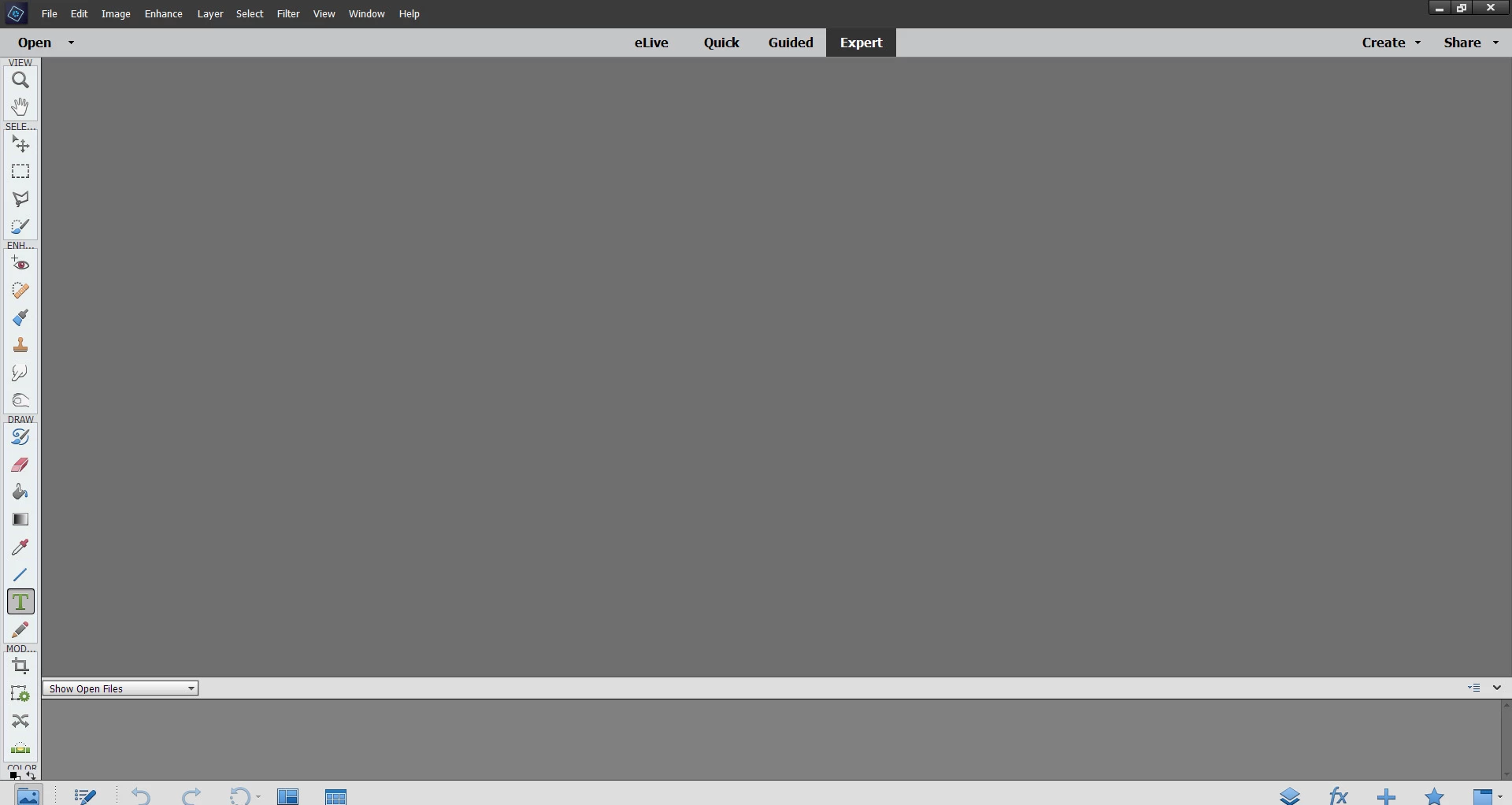
My screen cuts off the color selection tool at the bottom

  • January 7, 2019
  • 1 reply
  • 393 views

My screen is 1920 x 1080 on Windows 7 (yes I haven't upgraded).  Originally, Elements was always fine.  After one of the upgrades, it has been stuck like this.  I can't change colors -- see the lower left.  Is there another way to move the tool bar or anything?   

Here's a pic of the problem (look at the lower left)
Thanks for any advice.

This topic has been closed for replies.
Correct answer 99jon

It looks like everything got arranged in one long strip. Try deleting the saved prefs. Go to:

Edit >> Preferences >> General (tab)

Click the button to reset preferences on next launch and click OK

Quit the application and then re-open the Editor.

1 reply

99jon
99jonCorrect answer
Legend
January 7, 2019

It looks like everything got arranged in one long strip. Try deleting the saved prefs. Go to:

Edit >> Preferences >> General (tab)

Click the button to reset preferences on next launch and click OK

Quit the application and then re-open the Editor.

ax0n12Author
Participant
January 7, 2019

Fixed!  Wow - that was very fast and worked instantly.  Thank you so much 99jon!