
Participating Frequently
January 21, 2024
Question

Need Help Restoring Brushes

  • January 21, 2024
  • 4 replies
  • 535 views

Hi All! I have a really old version of Photoshop Elements 5.0.......so old, that I had to download a virtual XP OS to use it! Bought it on Disc online. This version works very well for my uses, and I'd rather not move to another version.

     I downloaded some brush files for using in projects and now, when I click on the "dry media brushes" it opens up with one of the files I downloaded, instead of the original dry media brushes. Same thing with "basic brushes"....now it opens with a new downloaded file of brushes! I tried deleting the new brushes from the folder on my C drive, but they are still in my photoshop program. I've also tried doing the reset brushes from the preset manager, but it doesn't restore my dry media brushes...it takes me to my default brushes option. The dry media brushes are still visible in the program files, but when I tried to load them as "replace brushes" in the system, they just keep on being the new downloaded brushes.

Akkkkk...

I can work around this issue, but would like to get my original dry media brushes back! Here's a pic of my preset manager window for my dry media brushes. As you can see, there is not an option to save set, rename or delete!

thanks bunches,

  Ellen
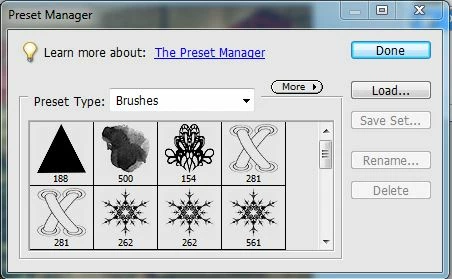
This topic has been closed for replies.

4 replies

Jeff Arola
Community Expert
Community Expert
January 27, 2024

In photoshop elements 5 make sure your in Full Edit, then select the Brush Tool in the tools palette.

In the tool options bar click on the area that shows the brush preview to get the brush picker, then click on

where it says Brushes to get the drop-down menu for selecting the brush set.


Participating Frequently
January 28, 2024

Hi Jeff,

     I'm thinking we have different PS Elements 5 versions! Mine is extremely old and is labeled for use with Vista or XP. I do not have the thumbnail box of the brushes in the set like the one you have in your screenshot. My brush previews appear in the same drop down window as the "brush set list". My brush tool works fine in most of the sets listed in the drop down menu of brush sets. It is only the "dry media brushes" and "basic brushes" that are changed (modified, if you will) and all the others are the original brushes that came with the program. When I go to the "load brushes" option in the menu that opens to the right of the "brush set list" (when I click on the ">>" option) those 2 files appear as having been modified. When I hover over those 2 brush files, they give a "date modified" date, which is probably when I accidently loaded the new brushes into the original files and now I can't restore them to the original files that came with PS Elements 5.0 that are listed as "dry media brushes" and "basic brushes"

here is a snip of the brush option that comes up when I click on the "load brushes" option.

Jeff Arola
Community Expert
Community Expert
January 28, 2024

Can you post a screenshot of photoshop elements with the Brush Tool selected so we can see what your version looks like?


The reason i wanted to see all the brushes in the Dry Media set is maybe the original brushes are still there and the new ones were simply added to that set. Same with the Basic Brushes.

Jeff Arola
Community Expert
Community Expert
January 26, 2024

In the photoshop elements 5 editor click on the Brush Tool, then load the Dry Media Brushes

so you can expand the  brush picker to see all the brushes in that set.


Then if you would post a screenshot of what your seeing.


Participating Frequently
January 27, 2024

Hi Jeff...when I try to take  a snip of my screen, the "brushes" menu that drops down that shows the brushes in my "dry media brushes" folder retracts and I can

t get a screenshot of it. The pic I posted above shows  what brushes appear in my "dry media burshes" set. I believe I may have modified the "dry media brushes" default set with one I downloaded from online. When I try and perform a "restore to previous version" it won't let me load the original brushes form the Adobe preset files. My version of Photoshop Elements 5.0 is from a disc dated 2006. The screen you show in your post looks different than mine.

Jeff Arola
Community Expert
Community Expert
January 21, 2024

These are the Brush sets that installed with photoshop elements 5.


If you save a new set you should rename to something else other than one of the installed brush sets.


Participating Frequently
January 26, 2024

Hi Jeff,

   I have all those brushes listed in my program's brushes drop down menu, but when I click on "dry media brushes" a set I downloaded appears there instead of the normal dry media brushes.

This is a pic of what appears on my dry brushes when I select them!

Jeff Arola
Community Expert
Community Expert
January 21, 2024

In the Preset Manager click on the first brush, then shift click on the last brush, then Save Set should be enabled.