
Inspiring
October 11, 2024
Answered

NEF file looks damaged in PSE, but OK in Windows File Explorer

  • October 11, 2024
  • 3 replies
  • 677 views

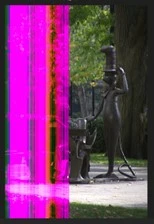
I recently took several shots within a few minutes of each other. Two of them appear damaged when viewed in the PSE Organizer and Editor, but look fine in Windows File Explorer and the Fast Stone viewer. Does anyone know what's going on? The second shot is totally covered in vertical magenta lines.

.
This topic has been closed for replies.
Correct answer Billflyer

Hey Bill!

I've responded to you via DM with my email 2 days ago.

Please check and get back to me. 

Thanks!


@Sameer KI deleted all 8 files from my SSD and downloaded them again, directly from my camera. Problem solved. Apparently there was a glitch during my original download.

3 replies

Greg_S.
Community Expert
Community Expert
October 28, 2024

@Billflyer, thanks for letting us know what fixed your problem.

Greg_S.
Community Expert
Community Expert
October 23, 2024

@Billflyer, as I have mentioned in your duplicate thread , you can try zipping your NEF file and attaching it to a post on the forum.

Sameer wants you to use the @symbol in your post.  When you do so, a dropdown menu will pop up which you can use to "mention" him in the post.  He will then get a notification that you have responded to him. 


I am locking your other thread so that all further discussion can happen in this thread.

BillflyerAuthor
Inspiring
October 23, 2024

@Sameer KApparently, you did not receive my reply to your questions. I am having trouble dealing with the requirements of this site. This will be my third attempt.

I shot 8 pics within 5 minutes of each other in .nef format. All 8 look fine in-camera. I downloaded them to an external SSD as usual, and then imported them into the PSE Organizer. The Organizer (and the Editor) show the first 2 shots with magenta stripes, as in my first post. These stripes also appear when the files are viewed with the WIndows Photo app, but are fine in the Fast Stone viewer.

Bill
BillflyerAuthor
Inspiring
October 23, 2024

I attempted to attach 2 files to my last post, but I don't see them. Previously, I got an error message when I attempted to attach a ZIP or an NEF. If you will give me an email addy, I can upload files to Nikon Image Space. From there I can send you a link to them.

Bill
Sameer K
Community Manager
Community Manager
October 21, 2024

Hey, @Billflyer. Welcome to the Photoshop Elements Community. I'll help you figure this out. 


Does this happen with a specific set of images? Where are the original images stored? Is it an internal or external storage location?

It could be possible that the RAW data of the images is corrupted, and other apps are not reading the entire RAW image. If possible, share a few sample images with me via direct message on my profile.  


Thanks!

Sameer K

(Use '@mention' to tag me when you reply)

BillflyerAuthor
Inspiring
October 23, 2024

Hi Sameer—


Sameer-- Did you get my reply?

I’m not sure what you mean when you say to  “direct message on my profile” and  “Use '@mention' to tag me when you reply”

Adobe does not let me attach an .nef file.  

Bill

Bill