Suzanne5CDF
Participant
November 2, 2020
Answered

New to PSE2021 and have some questions

  • November 2, 2020
  • 1 reply
  • 305 views

Hi there, 

I just bought PSE2021 and now trying to get familiar with the program. I have used PSE4 for 15 years because I just loved it and we have been good friends. But with a new pc I decied to upgrade my softwares. One thing I find enoying is that I am so use do use the scroll on my mouse to zoom pictures + - but it seems like that feature is not there in this new version. Must I use both hands for alt+scroll or have I missed something? The other thing is when I am finished with a picure and want to close it I now have to use ctrl+w instead of just clicking on the x in top corner. It seems like new things always not is better!! 

/Suzanne in Sweden 
This topic has been closed for replies.
Correct answer Greg_S.

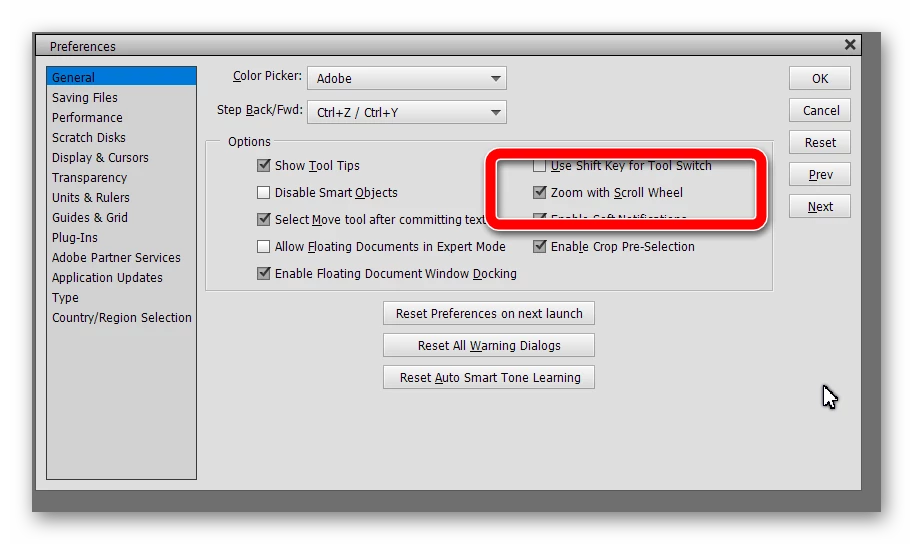
Zoom with scroll wheel has to be enabled in Edit>Preferences>General.  (I've never understood why the default is off.)

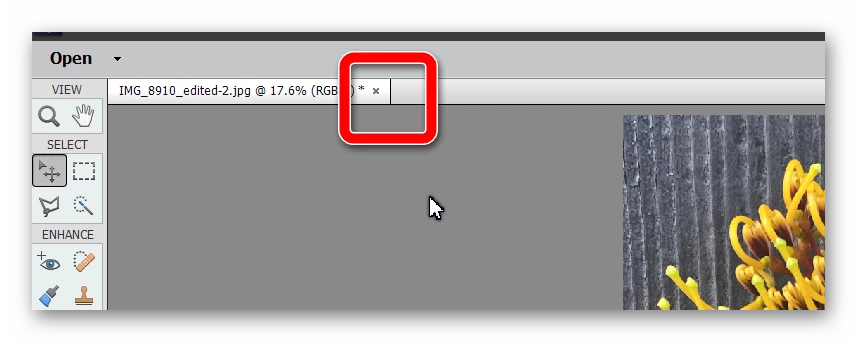
Clicking the X on the image tab works fine for me.  Don't know why it would not work for you.  Is this the control you are talking about:


1 reply

Greg_S.
Community Expert
Greg_S.Community ExpertCorrect answer
Community Expert
November 2, 2020

Zoom with scroll wheel has to be enabled in Edit>Preferences>General.  (I've never understood why the default is off.)

Clicking the X on the image tab works fine for me.  Don't know why it would not work for you.  Is this the control you are talking about:


Suzanne5CDF
Participant
November 2, 2020

Greg you are my hero!! Thanks a lot!

I had no idea about that default about that scroll wheel.

About that X I need to open my eyes more and look at opposite side than I am use to.