
Inspiring
January 18, 2025
Answered

NIK Collection plug-in keeps popping up on screen

  • January 18, 2025
  • 2 replies
  • 329 views

I had this happening when I had this plug-in on my windows 10 desktop with 2022 PS Elements and I cannot remember what I did to get it to stop appearing as soon as I open up the editor program. 
I transferred it to my new windows 11 desktop and now it keeps appearing In little box listing the different features it has. . Any idea how I can keep in the background.  Thanks 
Correct answer Jeff Arola

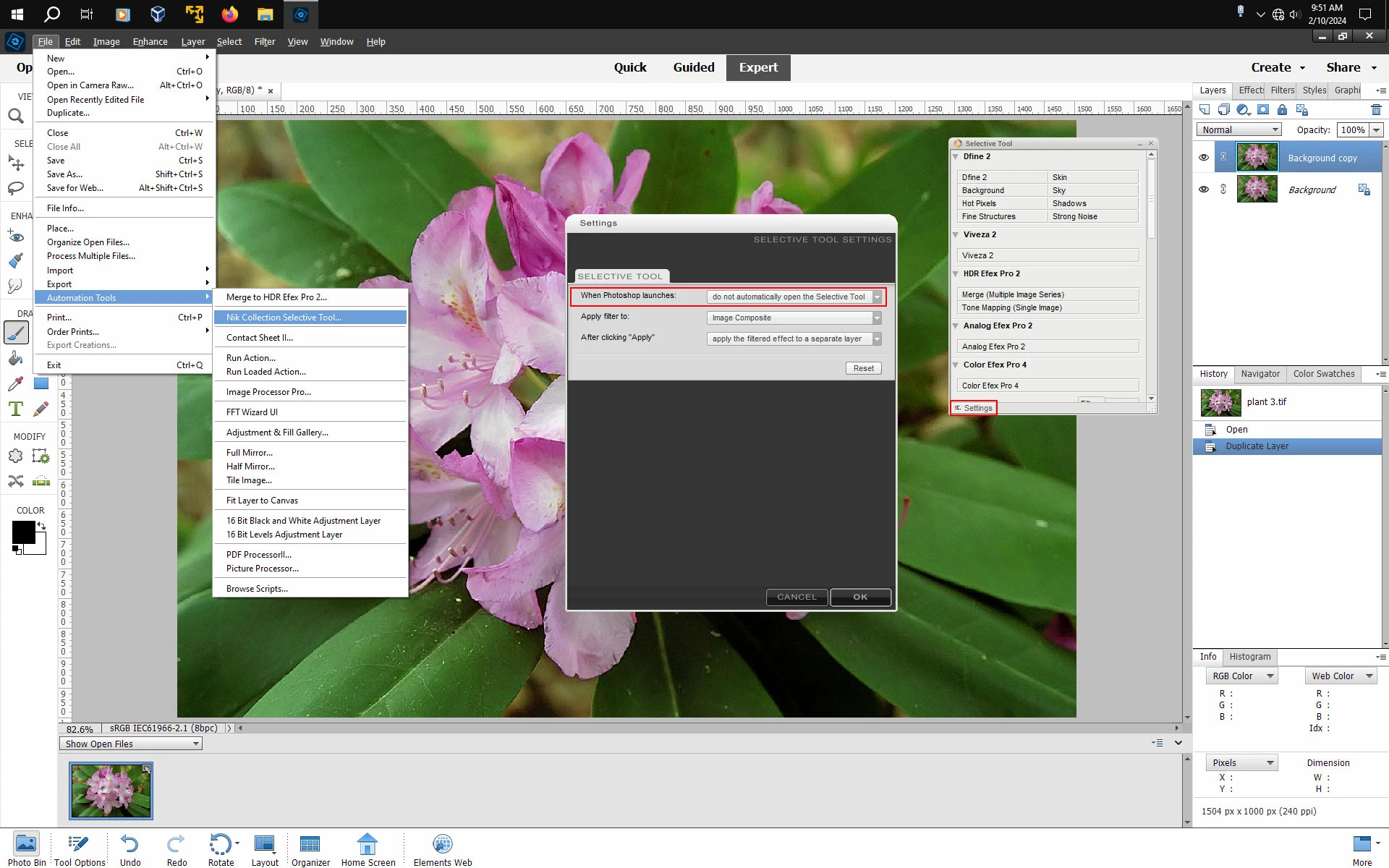
I've disabled the Selective Tool by going to File>Automation Tools>Nik Collection Selective Tool, clicking on the Settings in the Selective Tool panel and setting When Photoshop Launches to do not automatically open the Selective Tool.

You can always go to File>Automation Tools>Nik Collection Selective Tool to reopen it.


2 replies

Jeff Arola
Community Expert
Community Expert
January 18, 2025

You can get a user manual in pdf form from here.

https://userguides.dxo.com/nikcollection/en/


Not sure what version you have, but for example, if you have the free Nik Collection from some years ago, i believe

Nik Collection 4 is the closest match.


Inspiring
January 18, 2025

Should have been clearer -- yes it is the original free collection. I take a lot of wildlife and landscape, so have really focused on realism but thought at some point would be interesting to dabble in the other options.  Thanks I will check into that and experiment a bit when back from my cabin to my desktop. 

Jeff Arola
Community Expert
Jeff ArolaCommunity ExpertCorrect answer
Community Expert
January 18, 2025

I've disabled the Selective Tool by going to File>Automation Tools>Nik Collection Selective Tool, clicking on the Settings in the Selective Tool panel and setting When Photoshop Launches to do not automatically open the Selective Tool.

You can always go to File>Automation Tools>Nik Collection Selective Tool to reopen it.


Inspiring
January 18, 2025

Thanks that worked.  Gather I can open it from the menu in Filters when needed. 
Any suggestions how best to use the features in the NIK collection-- is there a resource that explains each of the features?