Participant
December 17, 2022
Answered

No C:\Program Files\Adobe\Photoshop Elements 2019\Plug-Ins\ folder

  • December 17, 2022
  • 4 replies
  • 807 views

System info from within PS Elements 19 app shows:


Required Plug-ins folder: C:\Program Files\Adobe\Photoshop Elements 2019\Required\Plug-Ins\
Primary Plug-ins folder: C:\Program Files\Adobe\Photoshop Elements 2019\Plug-Ins\


But there are no such folders


Everytime I try to create one here with this name the folder disappears
 

This topic has been closed for replies.
Correct answer Greg_S.

Why are you trying to create a new folder and exactly where are you trying to create it?

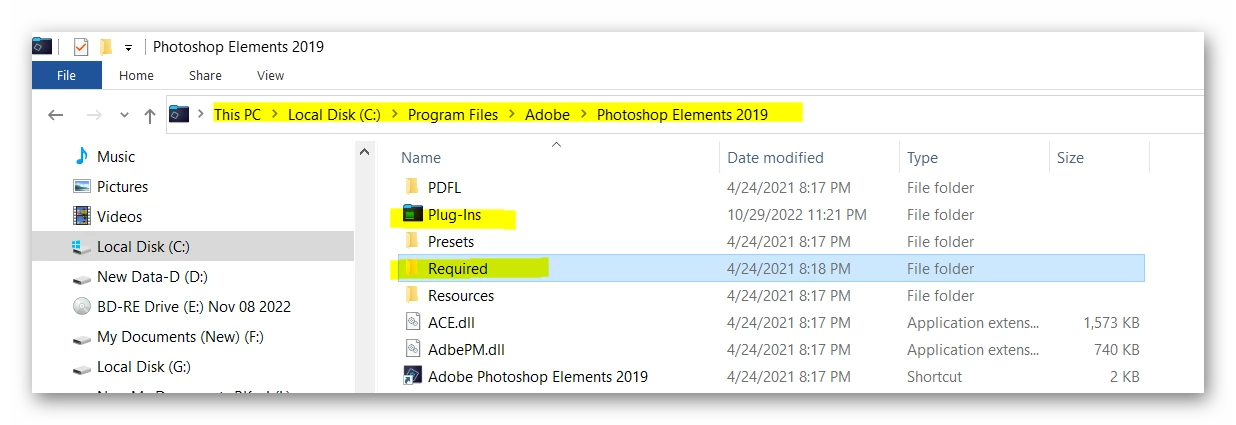
Please show us a screenshot of  the path to the Photoshop Elements 2019 program folder with the contents displayed like this:

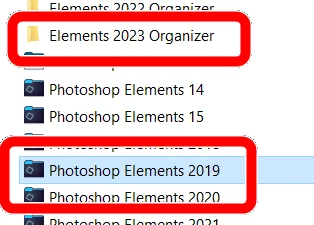
Are you sure you are not being confused by the fact that the program folder icon is colored rather than a standard Windows yellow folder:


And, in Windows File Explorer, do you have the Hidden items box checked or unchecked in the View menu?


4 replies

Greg_S.
Community Expert
Community Expert
December 18, 2022

@jonathant53561722 said:

then when I choose photo editor option and get the system information from PS Elements 2019 , it show that I am using 2017:

Again, you are not the first one to be confused by this.  Photohsop Elements 2019 is the marketing name for Elements Version 17 (not 2017).

Participant
December 20, 2022

Thanks again fir the info. All sorted now

Greg_S.
Community Expert
Community Expert
December 18, 2022

I don't think you read my whole response to you or saw my earlier screenshots. The folder icon for the program is hidden in plain site:


You are not the first one to be confused by the colored icon and you won't be the last.

Participant
December 20, 2022

Yes, you're right. Why they had to change the icon to make it look like I file, I don't know. All sorted. Many thanks

Greg_S.
Community Expert
Greg_S.Community ExpertCorrect answer
Community Expert
December 17, 2022

Why are you trying to create a new folder and exactly where are you trying to create it?

Please show us a screenshot of  the path to the Photoshop Elements 2019 program folder with the contents displayed like this:

Are you sure you are not being confused by the fact that the program folder icon is colored rather than a standard Windows yellow folder:


And, in Windows File Explorer, do you have the Hidden items box checked or unchecked in the View menu?


Participant
December 18, 2022

This is my "Program Files\Adobe" folder:


As you can see not even the "Photoshop Elements 2019" folder is present. Not sure at all why this is the case. I've got a plug-in working by adding it to the "\Program Files\Common Files\Adobe\Plug-Ins\Elements 17\File Formats" folder:


... but still not sure why "Photoshop Elements 2019" folder is missing. Also when I open the program:

  • first I get the usual choose-one-of-three-programs screen from Elements 2019 (here clearly 2019) - OK
  • then when I choose photo editor option and get the system information from PS Elements 2019 , it show that I am using 2017:
quote

Adobe Photoshop Elements Version: 17.0 (20180830.m.125874) x64
Operating System: Windows 10 64-bit
Version: 10 or greater
System architecture: Intel CPU Family:6, Model:6, Stepping:1 with MMX, SSE Integer, SSE FP, SSE2, SSE3, SSE4.1, SSE4.2, AVX, AVX2, HyperThreading
Physical processor count: 4
Logical processor count: 8

Required Plug-ins folder: C:\Program Files\Adobe\Photoshop Elements 2019\Required\Plug-Ins\
Primary Plug-ins folder: C:\Program Files\Adobe\Photoshop Elements 2019\Plug-Ins\


What is happening here?

Jeff Arola
Community Expert
Community Expert
December 17, 2022

What version of windows are you using?


Is your pse 2019 from the Microsoft Store?

Participant
December 18, 2022

Windows 10


Version is downloaded from Adobe who at the time helped install it when I had problems


See also my answer to @Greg_S. with some systemt details shown