jesusg56145788
Participant
June 6, 2021
Answered

no entiendo

  • June 6, 2021
  • 2 replies
  • 316 views

Hello friends, I am unable to transfer an rwl photo from leica to jpg with photoshop elements 2021, you can put it step by step, I first open a photo, I get camera raw, I fix it, for example crop, and then what do I do?,

This topic has been closed for replies.
Correct answer Greg_S.

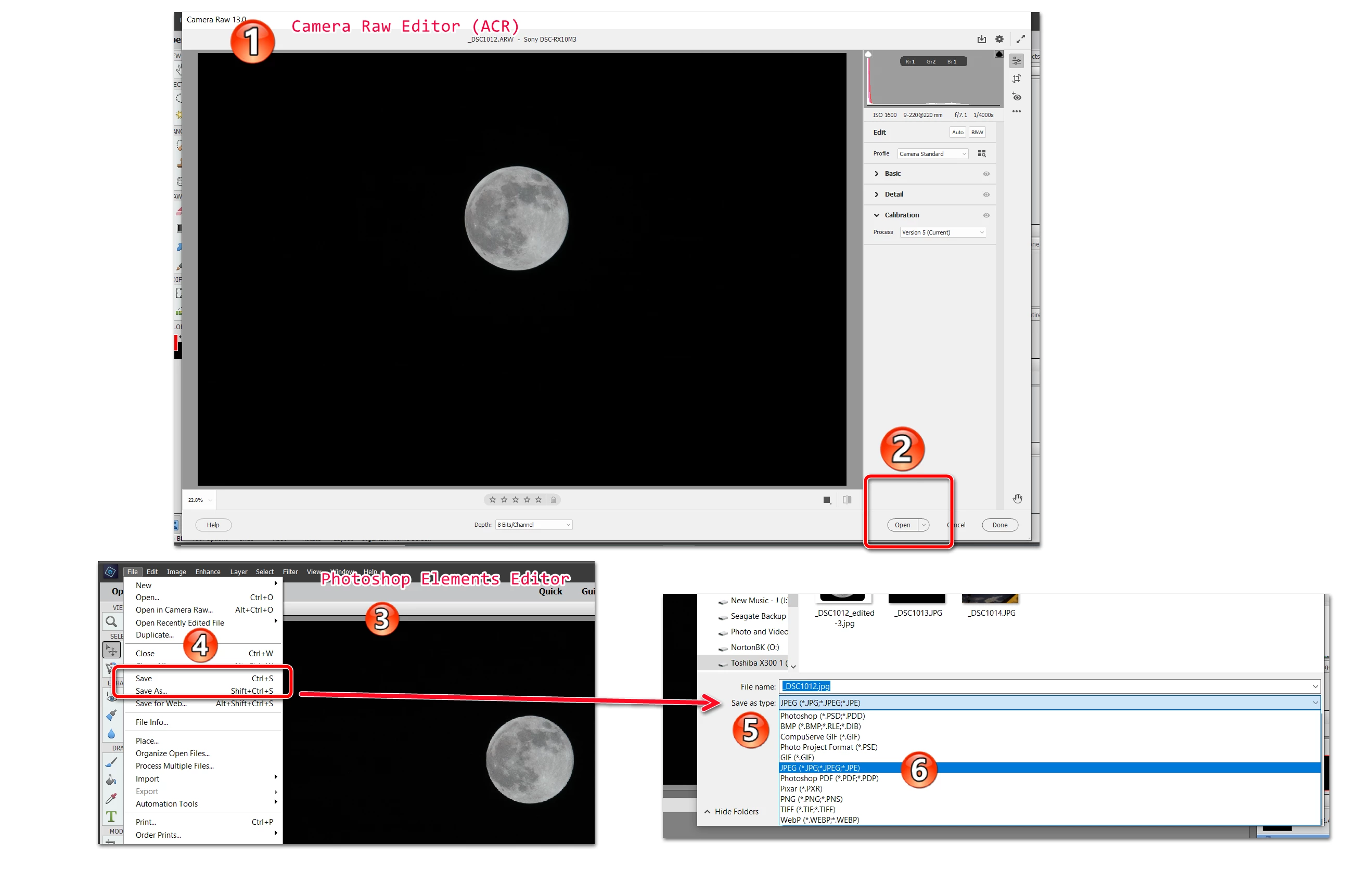
OK, I should have given you a screenshot to make myself clearer.


  1. Open the raw file in the camera raw editor (ACR)
  2. Once you have made your edits there, click on the Open button at the bottom of the ACR
  3. The Photoshop Elements Editor will then open, and you can make further edits there.
  4. Select Save or Save As from the File menu
  5. In the Save or Save As dialog, click on the Save as type dropdown menu
  6. Select JPEG in the list.


Your edited raw file will now be saved as a jpg file.  Any changes that you made in the ACR will also be preserved if you view the file in the Organizer.  However, the changes are saved in what is known as a sidecar file.  No changes are actually made to the original raw file. 


If you only want to preserve the editing changes for viewing in the Organizer, you simply click  on the Done button in the ACR (next to the Open button).  The Organizer thumbnail will update with your ACR changes.


2 replies

Greg_S.
Community Expert
Greg_S.Community ExpertCorrect answer
Community Expert
June 6, 2021

OK, I should have given you a screenshot to make myself clearer.


  1. Open the raw file in the camera raw editor (ACR)
  2. Once you have made your edits there, click on the Open button at the bottom of the ACR
  3. The Photoshop Elements Editor will then open, and you can make further edits there.
  4. Select Save or Save As from the File menu
  5. In the Save or Save As dialog, click on the Save as type dropdown menu
  6. Select JPEG in the list.


Your edited raw file will now be saved as a jpg file.  Any changes that you made in the ACR will also be preserved if you view the file in the Organizer.  However, the changes are saved in what is known as a sidecar file.  No changes are actually made to the original raw file. 


If you only want to preserve the editing changes for viewing in the Organizer, you simply click  on the Done button in the ACR (next to the Open button).  The Organizer thumbnail will update with your ACR changes.


jesusg56145788
Participant
June 7, 2021

gracias, muchas gracias

Greg_S.
Community Expert
Community Expert
June 6, 2021

You need to open the file from the raw editor.  This will take you to the main Editor where you can save the file to jpg.

jesusg56145788
Participant
June 6, 2021

But when I import the raw from leica it goes directly to camera raw, I fix it, and then what do I do?