Answered
Object removal brush in Guided Edits is not round
The object removal brush in Guided Edits was initially round. But now it is irregularly shaped, with zig-zag lines, like a rectangular amoeba. How can I get the brush to be round again?

The object removal brush in Guided Edits was initially round. But now it is irregularly shaped, with zig-zag lines, like a rectangular amoeba. How can I get the brush to be round again?
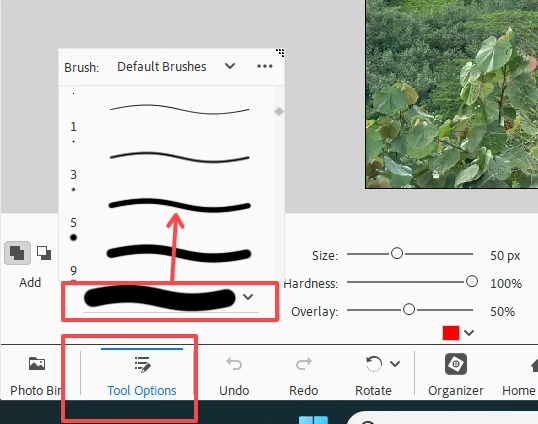
Click on the Tool Options button in the lower left of the Guided Edit. This will allow you to access the Brush options and you can choose a more appropriate brush.
Already have an account? Login
Enter your E-mail address. We'll send you an e-mail with instructions to reset your password.


 AdChoices