

Participant
December 12, 2020
Answered

Object Removal panel missing

  • December 12, 2020
  • 2 replies
  • 676 views

Object Removal panel is missing from Guided Basics (Photoshop Elements 2019, Ver. 17)

I only see these nine panels, what happened to the Object Removal panel??
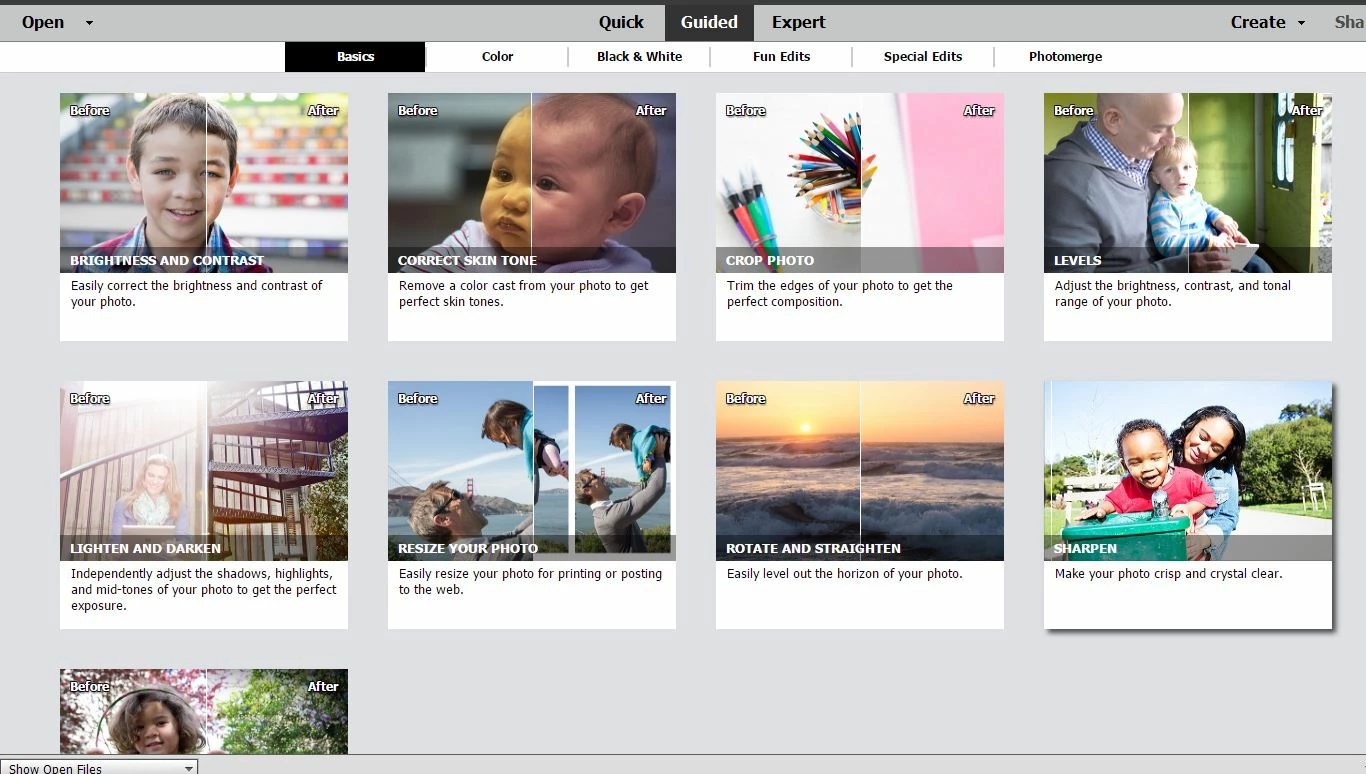
This topic has been closed for replies.
Correct answer arshla jindal

Hi Andy,


We're glad to have you onboard with PEPE 2021 as well.


All PSE and PRE versions are independent apps and can co-exist with/without different versions. So you need not uninstall the older version to install and use the newer version. We recommend you to keep using both the applications on the same computer, if you like.


Thanks.

2 replies

Participant
December 15, 2020

Thank you Arshla for the info,

I just got a new version of Adobe Photoshop Elements & Premiere 2021

and my next question is; Do I need to uninstall first the old ver 17.0 or just install the new version 2021 and let the program run it? What is the best way to handle this?

I have Windows 10, 32 gb memory, 4 gb video card and 52gb left on C drive

Thank you

arshla jindalCorrect answer
Adobe Employee
December 15, 2020

Hi Andy,


We're glad to have you onboard with PEPE 2021 as well.


All PSE and PRE versions are independent apps and can co-exist with/without different versions. So you need not uninstall the older version to install and use the newer version. We recommend you to keep using both the applications on the same computer, if you like.


Thanks.

Participant
December 15, 2020

Thank you again Arshla

this helps me a lot

Adobe Employee
December 14, 2020

Hi @Andy_Kace4 


Object Removal Guided Edit was first introduced in Photoshop Elements version 2020. This feature is not available in versions prior to PSE 2020.


Thanks.
