

Valentina ♡
Inspiring
February 29, 2024
Question

Oil Paint action problem (Adobe team, can give also to us the Oil Paint filter?)

  • February 29, 2024
  • 3 replies
  • 1006 views

Edit:

Adobe team, can you help also  to make our dreams come true and have a real oil paint filter for Photoshop Elements? 


Hello. I've purchased a photography video lesson and it includes  an action called Oil Paint.atn

Now, I've tried to install in action on photoshop element but an error says me this:
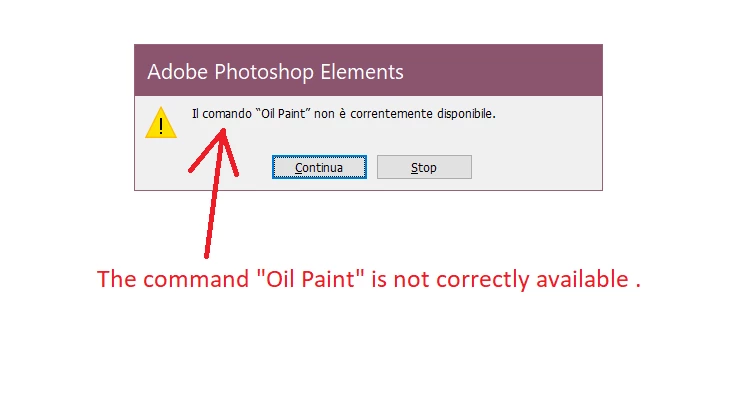
 

SORRY, I wrote "correctly", in the truth says "currently"


I also wanted to test if this was a problem only with photoshop elements error or if this error would happens also with Photoshop cs6 extended trial version , so I tried a trial version and yet, it says the same message error. 

(the oil filter works if I used directly from Filter, but if I go in the action I've purchased with the tutorial, it gives error)
What could be the problem ? 
PS if I PM the same oil filter action, can you tell me if it works with another different version of Photoshop, or if it gives the same message? Maybe the file atn, is corrupted? (I also asked to the owner of the tutorial photography (that created the oil filter action) and she sent it again and yet still gives always that message .
Thanks for the help in advance !


This topic has been closed for replies.

3 replies

Valentina ♡
Inspiring
March 2, 2024

Thank you to all.. 

really? So I can't use oil filter in any way?
Not even with xxl elements? That's so sad.. why adobe don't let us also to have oil paint filter!! :((((((((((((((((((((((((

My brothers  purchased for me tutorials from a photographer , purchased for me Photoshop Elements.. we spent a lot of time and still I can't complete what I wanted to learn...

I don't think she can have time to make recording actions again for me... :((


Edit: theres no actions that work for photoshop elements?

like these, are for photoshop elements?
35+ Best Oil Paint Photoshop Actions | Free PSD, DNG, ATN Formats (templateupdates.com)
I dont understand why adobe give on photoshop element a real oil paint filter. 


Valentina ♡
Inspiring
March 2, 2024

Dear Adobe team, this is the "oil' paint filter that we can apply on photoshop element?
 
This is not an oil filter. 

hatstead
Inspiring
March 2, 2024

Certain actions which are generated in Photoshop can be played in Photoshop Elements.

I suggest that you contact Panos, who offers free actions and also sells actions.

REFLECTIONS: free actions for Adobe Photoshop and Elements (panosfx.com)

Jeff Arola
Community Expert
Community Expert
March 1, 2024

Photoshop Elements doesn't have an Oil Paint filter.


Most likely the action was written with Photoshop CC in mind and would fail in Photoshop CS6

for the following reasons:

1. The Oil Paint filter is in a different menu location in Photoshop CS6; Filter>Oil Paint

    versus Filter>Stylize>Oil Paint in photoshop 20215.5 and later.

   That means the action will fail because it can't find the Oil Paint filter in Photoshop CS6.


2. The Oil Paint filter is different in Photoshop CS6 than the Oil Paint filter in Photoshop 2015.5 and later.

    So one would need to record different Oil Paint action steps to be compatible with Photoshop CS6.


Photoshop CS6 Filter>Oil Paint 


Photoshop CC 2019 Filter>Stylize>Oil Paint

(same location as the current Photoshop 2024)


Glenn 8675309
Legend
March 1, 2024

Actions are created with photoshop.   Actions rarely are specifically designed to work with photoshop elements. 

Even if you manually install the ATN file correctly it may (probably) will not work to your satisfaction. 
The action will run, then just stop when it gets to something that Photoshop Elements does not have the ability to do. 

PUT YOUR ACTION HERE: Then restart the program. 

C:\Users\User\AppData\Roaming\Adobe\Photoshop Elements\24.0\Presets\Actions