
Participant
August 22, 2018
Answered

On Screen text size and color

  • August 22, 2018
  • 1 reply
  • 366 views

PSE 14, Windows 10, HP Spectre, Quad-core graphics.

When I open the editor, the text is tiny, tiny, tiny!!!!  The colors are grey background and slightly darker grey foreground.  It is UNREADIBLE to my 72 year old eyes!  I have tried changing display resolution, but this does NOT impact text size, using 2560 X 1440.

Is there any way to change this?  I have looked in Preferences but did not find anything, (of course I couldn't read anything either!).
    This topic has been closed for replies.
    Correct answer Jeff Arola

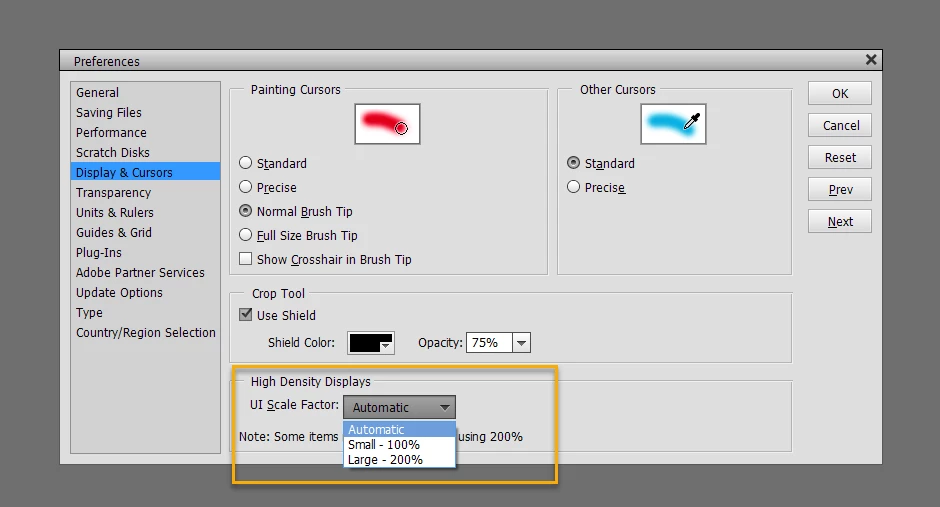
    In the pse 14 editor go to Edit>Preferences>Display & Cursors, set the Ui Scale Factor to Large-200% and restart the pse 14 editor.

    1 reply

    Jeff Arola
    Community Expert
    Jeff ArolaCommunity ExpertCorrect answer
    Community Expert
    August 22, 2018

    In the pse 14 editor go to Edit>Preferences>Display & Cursors, set the Ui Scale Factor to Large-200% and restart the pse 14 editor.

    gellsworAuthor
    Participant
    August 22, 2018

    Thanks Jeff!