frank-rr
Participant
April 25, 2021
解決済み

open jpg files in organizer

  • April 25, 2021
  • 返信数 1.
  • 365 ビュー

I shot ARW and JPG files and uploaded them to Organizer. I can see the ARW files but not the JPGs. I see the stack icon in the upper right corner of the ARW files. How can I open the JPGs to edit them?

 

このトピックへの返信は締め切られました。
解決に役立った回答 Greg_S.

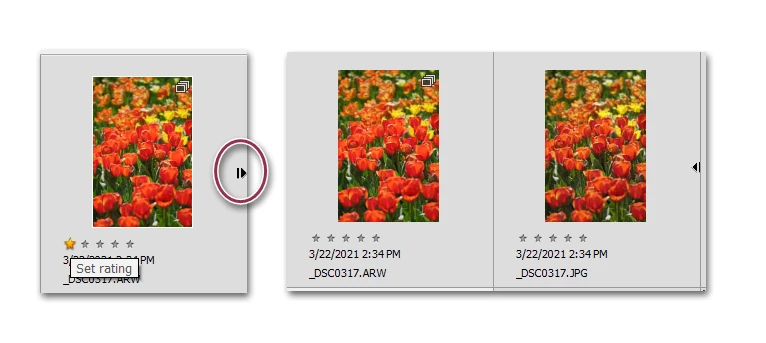
Make sure you are in Details view (Press Ctrl+D).  Your raw+jpeg stacks will then show a small arrow at the side.  Click on the arrow and the stack will open.  You can then select the jpeg and edit it in the Organizer with the Instant Fix editor or in the main Photoshop Elements Editor, using the Ctrl+I keyboard shortcut.


But why do you want to edit the jpeg rather than the raw file?

返信数 1

Greg_S.
Community Expert
Greg_S.Community Expert解決!
Community Expert
April 25, 2021

Make sure you are in Details view (Press Ctrl+D).  Your raw+jpeg stacks will then show a small arrow at the side.  Click on the arrow and the stack will open.  You can then select the jpeg and edit it in the Organizer with the Instant Fix editor or in the main Photoshop Elements Editor, using the Ctrl+I keyboard shortcut.


But why do you want to edit the jpeg rather than the raw file?

frank-rr
frank-rr作成者
Participant
April 29, 2021

Thanks, Greg. Just throwing together some lo-res samples.